DevOps practices for recovering a failed static release
Reproduce an HTML 200 and JavaScript 404 locally, diagnose the package omission, roll back, and verify the repaired release with HTTP and browser checks.
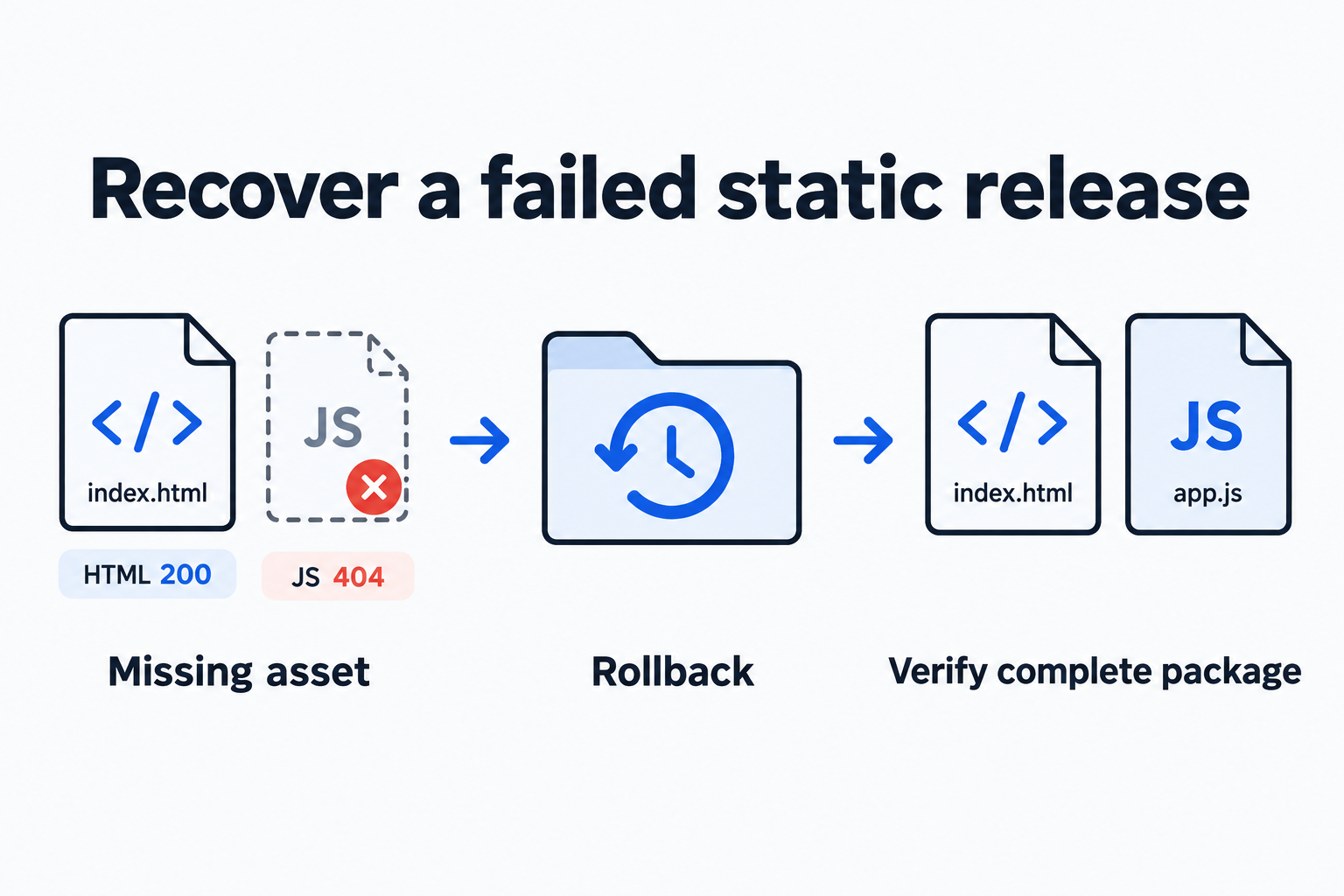
When a page loads but its behavior stops working, check the critical resources referenced by its HTML, then verify the intended browser action. These DevOps practices follow one local static-site fixture through diagnosis, rollback and repair. Omitting assets/app.js leaves the HTML at HTTP 200 while the script returns 404. Restoring the complete previous release recovers the page; the complete new package can then be verified.
The fixture uses only Python’s standard library, synthetic content and a temporary local HTTP server. It deliberately simulates an incomplete release package. The responses and browser states below were observed in an actual run of that fixture.
Make the failure reproducible
Download the sample, extract it and run:
unzip static-release-fixture.zip -d static-release-fixture
cd static-release-fixture
python3 reproduce.py results
The script creates three release directories: complete v1, HTML-only v2-broken, and complete v2-fixed. One server reads whichever directory the current symlink points to. After each switch, the script requests the page and script, checks assertions, and writes results/results.json. It shuts down its server and thread before exiting, and keeps copies of all three releases for manual inspection.
On Darwin arm64 with Python 3.9.6, the run produced:
Failure v2-broken HTML 200 JS 404
Rollback v1 HTML 200 JS 200
Repair v2-fixed HTML 200 JS 200
Narrow the symptom to the missing file
Inspect the release package, read the script URL in its HTML, then request that exact URL:
find results/v2-broken -type f
grep 'script src' results/v2-broken/index.html
python3 -m http.server 8000 --bind 127.0.0.1 \
  --directory results/v2-broken
curl -s -o /dev/null -w '%{http_code}\n' http://127.0.0.1:8000/
curl -s -o /dev/null -w '%{http_code}\n' \
http://127.0.0.1:8000/assets/app.jsThe file listing contains only index.html, yet the HTML references src="/assets/app.js". The two curl requests return 200 and 404. The listing tests whether the package contains the resource. The HTTP request tests whether the current server exposes it at the path used by the page. Both checks point to the same missing file.
MDN describes 404 as the server being unable to find the requested resource. A 404 alone does not distinguish an omitted file from an incorrect path or server configuration. Inspecting the release directory resolves that ambiguity in this fixture. A homepage returning 200 establishes that its HTML is available, without proving that JavaScript has executed.
Opening this server’s homepage shows Loading v2..., the initial HTML state. The missing script should have changed it to Ready v2. That visible state adds a functional check to the HTTP probes.
Restore the previous release and verify the repair
The automated script creates a temporary symlink to the candidate, then uses os.replace to replace current, avoiding a gap from deleting the active link first. In this fixture, switching back to v1 restores the script’s 200 response and the browser shows Ready v1. The complete v2-fixed package produces Ready v2.
For manual browser checks, stop your own server on port 8000, then restart it with --directory results/v1 and subsequently --directory results/v2-fixed. Visit the same root URL, http://127.0.0.1:8000/, for each version. Because the script URL is absolute, /assets/app.js, the server root must be the release being checked. Temporarily disabling browser cache while refreshing switched versions prevents a cached file with the same name from obscuring the observation.
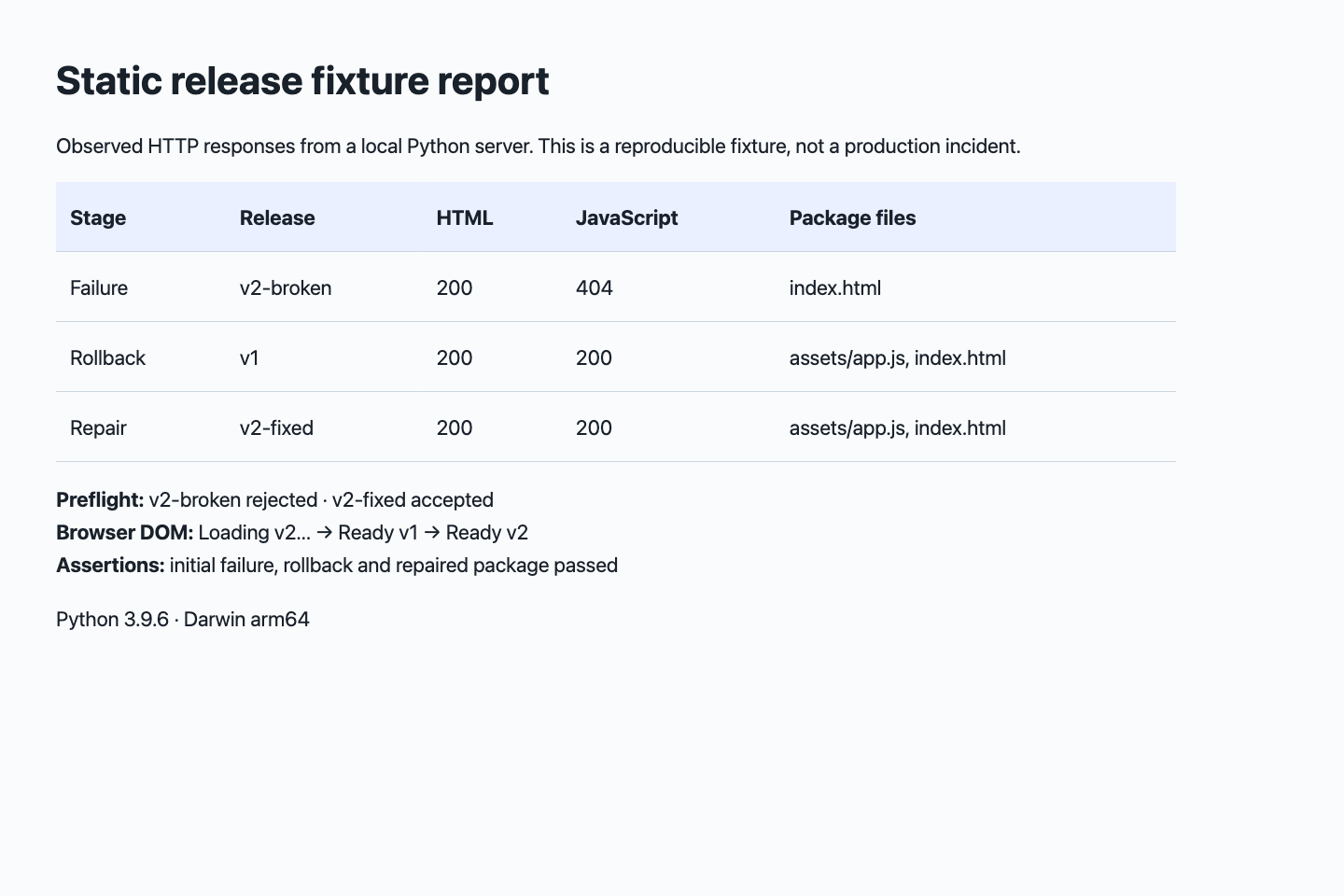
Local fixture report. The table records actual HTTP responses; the line below records browser states with each release served at its proper root.
| Stage | Homepage | Script | Browser state |
|---|---|---|---|
| New release missing its script | 200 | 404 | Loading v2… |
| Complete previous release restored | 200 | 200 | Ready v1 |
| Complete new release verified | 200 | 200 | Ready v2 |
Rollback requires an available previous package and a clearly defined switching target. This example has only static files. Applications with database migrations, background jobs or shared writable state also need compatibility checks between the previous code and current data. A symlink replacement models a single-machine filesystem switch; CDN and multi-node releases need their own recovery mechanism.
Turn the omission into a preflight check
Once the missing file is identified, make required files part of candidate-package validation:
required = ['index.html', 'assets/app.js']
complete = all((candidate / path).is_file() for path in required)
assert complete
This check rejected v2-broken and accepted v2-fixed. Two fixed paths are enough for this minimal fixture. A real build often uses hashed filenames: derive its resource list from the current HTML or build manifest, then check existence, response content type and one critical interaction. Adding only a homepage probe would still miss this failure.
The useful evidence is compact: the actual package, the commands and their results, and a known release to return to. Together they give the next investigation a concrete starting hypothesis and make successful recovery observable.
Reproduce and read further
The Python http.server documentation explains directory serving and explicitly advises against production use. Here it reduces the number of variables; a live release needs the same resource and interaction checks under its actual hosting arrangement.
Find more repeatable procedures in Workflows and methods.