After Your PWA Loads: Check Worker Headers, Logout Scope, and Analytics Queues
A reproducible local PWA lab for first-response HTML, Worker CSP, two independent sessions, and real PostHog SDK events that survive a tracking toggle.
A PWA can load correctly while hiding three problems behind its interface: the first HTML response contains only a loading shell; static pages have a CSP while dynamic pages omit it; and the scope of a logout or analytics toggle differs from what the button suggests.
I built a local PWA sample to observe these boundaries separately. The result: a Worker that returns complete HTML must also attach its response headers, logout needs an explicit session scope, and an analytics toggle must account for events queued before it was turned off. The download keeps the broken and fixed routes, actual responses, and probes so you can repeat the checks.
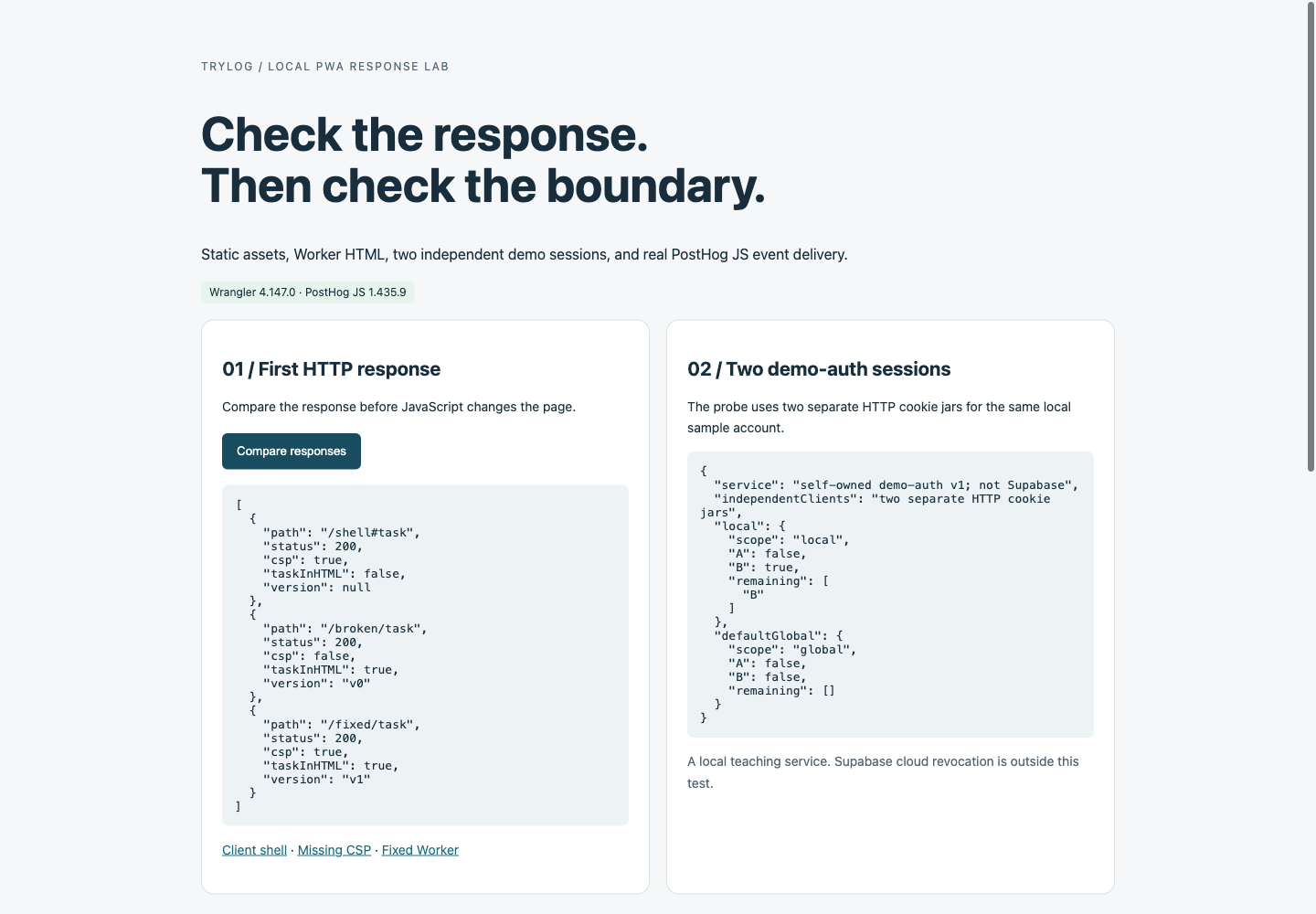
The lab compares first responses on the left and shows the self-owned demo-auth session results on the right.
Fix the environment and the observation target
The starting point was a developer’s PWA retrospective on Reddit. It mentions hash routing, Worker response headers, global Supabase logout, and PostHog cookieless mode. I used my own development-task text for the sample and examined those integration points.
The environment is pinned to Wrangler 4.147.0 and PostHog JS 1.435.9. For the Supabase parameter review, I installed @supabase/supabase-js 2.117.2 and inspected its Auth SDK. The Worker uses compatibility date 2026-10-05; all sample requests stay on local loopback addresses. The sample includes a manifest and a service worker observed controlling the Chromium page. That service worker uses a network-only path and caches no HTML, authentication responses, or analytics requests.
The running tests cover a local Cloudflare Worker, two HTTP client sessions, and the real PostHog browser SDK. I wrote demo-auth as a local teaching service; the analytics receiver only parses the SDK’s JSON batches. Supabase cloud revocation, PostHog server-side cookieless hashing, backend ingestion, and project settings were outside the live test. OS-level PWA installation, offline behavior, and the original author’s device results were also outside the observation.
Download the reproducible sample and response snapshots. It requires Node.js 22.12 or later, with dependencies pinned in the npm lockfile. After extraction, run npm ci; its prepare step copies the real PostHog SDK. Then use three terminals:
# Terminal 1: local session service and event receiver
npm run collector

# Terminal 2: local Cloudflare Worker on port 8791
npm run dev

# Terminal 3: response and two-session assertions
npm run probe
Open http://127.0.0.1:8791/lab and click Compare responses, then Run analytics cases. If Wrangler reports that asset watching is unavailable, restart dev after the probe generates the session result so the page loads the new file. The download’s observed/ directory contains snapshots from this run; rerun the probes to observe your environment.
When does visible content enter the HTTP response?
The sample serves the same task text through two paths. The original HTML at /shell#task contains “Loading task…” and an empty container. shell.js inserts the task after execution. At /fixed/task, the Worker writes the task into the HTML it constructs.
Seeing text on the page shows that the rendered DOM has content. To check whether the first response contains that content, save the GET response body:
curl -sS -D shell.headers http://127.0.0.1:8791/shell -o shell.html
curl -sS -D fixed.headers http://127.0.0.1:8791/fixed/task -o fixed.html
#task is a browser-side fragment and does not travel in the HTTP request. With the task in the hash, the Worker still receives /shell. Rendering a task-specific page requires a path or query parameter that the server can distinguish.
The probe checks all three raw responses for the same task sentence and CSP:
| Route | HTTP status | Task text in first response | CSP header |
|---|---|---|---|
/shell#task | 200 | Absent | Present, from static _headers |
/broken/task | 200 | Present | Absent |
/fixed/task | 200 | Present | Present, set by the Worker |
A static page can also contain complete text at build time; the empty shell here is a failure sample. Choose static generation or request-time rendering according to content updates and access control. The original author’s report that Google saw about 20 words is self-reported, with no search-console evidence available to me. This test establishes the difference between raw HTML and browser rendering; Google’s handling after JavaScript execution needs separate observation. The original post also mentions an IndexNow notification. This article sent no notification and verified no indexing outcome.
Why does the dynamic page still lack CSP?
public/_headers sets CSP for /*, so the static shell receives the policy. Although /broken/task matches the same URL pattern, that Worker branch returns new Response(html) directly and bypasses the static asset header step.
Cloudflare’s Static Assets headers documentation distinguishes these paths: _headers applies to static asset responses; headers for Worker-generated responses belong in Worker code. The fix therefore sits where the response is constructed:
const headers = new Headers({
  'Content-Type': 'text/html; charset=utf-8',
  'Content-Security-Policy': csp,
  'Cache-Control': 'no-store',
  'X-Content-Type-Options': 'nosniff',
})
return new Response(html, { headers })
The sample’s policy allows same-origin scripts, styles, connections, images, and service workers, with additional frame-ancestors, base-uri, and object-src restrictions. It loads the SDK locally and sends captures through a same-origin local proxy. This policy fits the sample. Third-party scripts, cross-origin authentication, and image sources need a policy designed and checked against the actual resources.
Besides asserting that the broken response lacks CSP and the fixed response has it, probe.mjs compares the complete policy strings from the static and fixed pages. Checking only header presence would miss policy drift. The sample still stores the values separately, so this assertion constrains them; a production build can generate both the static file and Worker constant from one policy source.
Also inspect error responses, redirects, and authenticated routes: each branch constructing a response can have its own header behavior. Evaluate caching together with private content. The fixed route here uses no-store and does not reuse a public HTML cache. When modifying a proxied response’s headers, keep response.body as a stream rather than buffering a large body merely to add headers.
Observe logout from a second session
Deleting login state in one tab proves that client’s state changed. Testing “sign out this device” requires a second independent session. The probe uses two separate HTTP cookie jars to create server sessions A and B for the same self-owned sample account.
First, A signs out with scope: "local". Subsequent /demo-auth/me requests return authenticated: false for A and true for B. Next, A signs in again and uses the sample’s default global logout. Both client checks return false, and the server’s remaining-session list is empty.
| demo-auth operation | Session A check | Session B check | Remaining server sessions |
|---|---|---|---|
| A signs out locally | false | true | B |
| A uses default global logout | false | false | Empty |
This verifies the local service’s scope and the testing sequence: server state, a second client request, then UI state. demo-auth uses server-side session lookup; revocation makes the next request fail immediately. Its mechanism differs from Supabase’s JWT model.
Both Supabase’s JavaScript signOut documentation and the installed GoTrueClient.ts specify global as the default scope. A Supabase product whose button means the current session should pass the scope explicitly:
const { error } = await supabase.auth.signOut({ scope: 'local' })
if (error) {
  // Show or handle the actual error before deciding the UI state.
}
The same documentation explains that logout revokes the relevant refresh token; an already-issued access-token JWT generally remains valid until expiry. A Supabase test should therefore record local storage, refresh failure, whether a protected API still accepts an unexpired JWT, and how the other client’s UI updates. A second page still saying “signed in,” or one immediately successful request, provides too little evidence to locate a revocation failure. This review covers official documentation and SDK parameters. Supabase cloud behavior across sessions still needs validation with a real service environment.
An analytics toggle has two queues to consider
PostHog’s cookieless_mode: "always" continues cookieless capture. In version 1.435.9, opt_out_capturing() warns and returns for this setting, while is_capturing() stays true. on_reject moves to cookieless capture after rejection, so that setting also differs from stopping event transmission. See the PostHog configuration documentation.
I pointed the real SDK’s api_host at the local receiver and disabled autocapture, pageviews, replay, flags, compression, and external script loading to isolate manual events. My initial decoder treated the SDK request as a bare array and lost the event fields. After checking this version’s request.js, I changed the receiver to read { batch: [...] } and obtained the event names. Counting only “three requests received” would have hidden a flaw in the measurement code itself.
The final receiver observed three events:
| Test | What the receiver observed | Interpretation |
|---|---|---|
| Capture after opt-out in always mode | always_after_optout | SDK capture continues |
| Normal mode: queue capture, then immediately opt out | normal_queued_before_off | An event already queued before Off is sent |
| Normal mode: capture after opt-out | No normal_after_off | New capture is blocked |
| Fixed mode: discard application queue at Off, then try capture | No pending pre-Off or post-Off events | Events not yet handed to the SDK are cleared |
| Fixed mode: turn analytics on and capture | fixed_after_on | Delivery resumes |
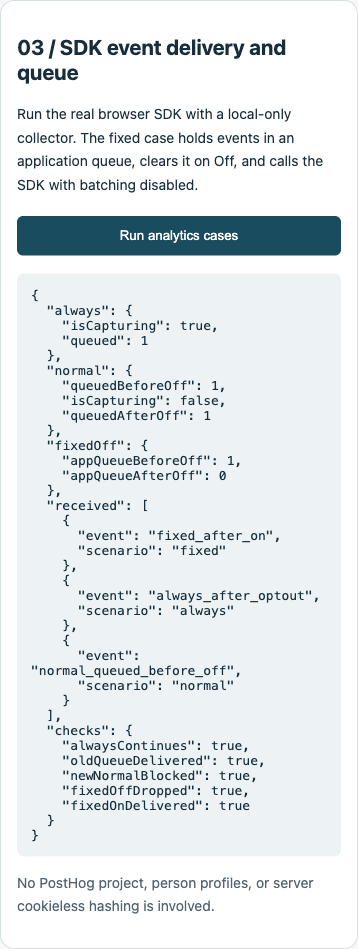
Event names received locally, alongside SDK queue observations.
There are two waiting areas: events saved by the application before the SDK loads, and events held by the SDK for batching. before_send filters events as they enter capture processing. An older event that has passed the filter and entered the SDK queue should not be assumed to pass through it again after the user changes the toggle.
The fixed sample keeps its waiting area in the application and disables SDK batching for that instance. It checks the toggle before application enqueue, before SDK dispatch, and in before_send:
let enabled = true
let pending = []

posthog.init('YOUR_PROJECT_TOKEN', {
  request_batching: false,
  before_send: event => enabled ? event : null,
  // Set other options for your project. The sample also disables autocapture.
})

function track(event, properties) {
  if (enabled) pending.push({ event, properties })
}
function turnOff() {
  enabled = false
  pending = []
}
function dispatch() {
  if (!enabled) return
  for (const item of pending) {
    posthog.capture(item.event, item.properties, { send_instantly: true })
  }
  pending = []
}
The running sample also makes a direct SDK call after Off to verify that before_send blocks new events bypassing the wrapper. It reads private _requestQueue fields for diagnosis and never mutates the SDK queue. Production behavior should depend on public APIs.
The fix’s contract is to clear events still waiting in the application and block subsequent new captures. Requests already in flight, SDK retries, other capture instances, and previously stored data need their own policies. A product promising “stop all transmission after Off” must test those paths too. The official JS usage documentation also states that the browser SDK exposes no public flush() method for custom events. Avoid inventing shutdown or clearing APIs from experience with another SDK.
Turn button promises into observable boundaries
In this sample, first-response content and CSP are separate assertions. Logout scope is checked with a second client’s request. The analytics toggle is checked against new events, application waiting events, and the SDK’s existing queue. That makes it possible to name the exact step a fix changes.
Bring the same method to your PWA: save representative first responses and headers, use independent sessions to check logout scope, give events explicit names before and after Off, and verify them at the receiving end. Keep the failing sample and dependency versions so a later upgrade has a concrete regression target.