Unit conversion with expressions: inspect arithmetic, offsets and rounding
Trace (12*4)+6.5, signed decimals and absolute zero through a local expression converter, base units, display rounding and a reproducible JSON export.
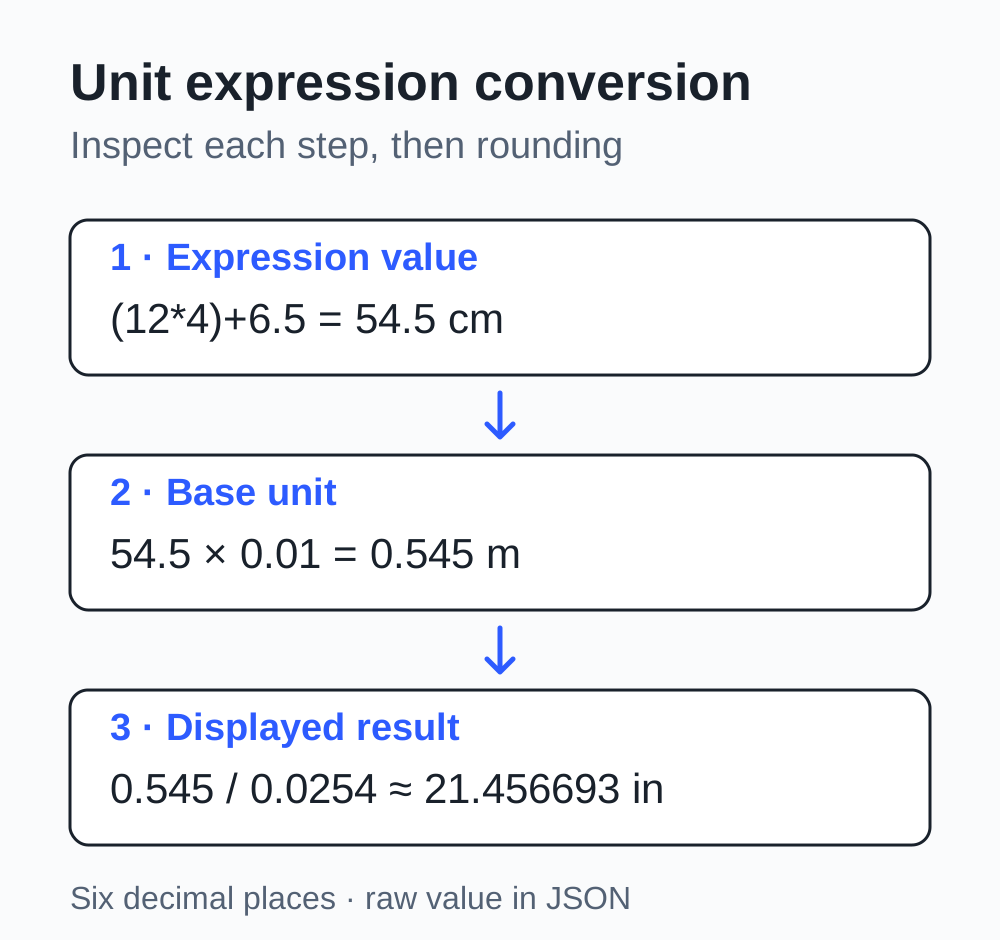
Four pieces are 12 cm long, and one more piece is 6.5 cm. How long is the total in inches? Calculating 54.5 first and copying it into a converter is quick, but the final number can lose its context. The unit expression converter keeps the original expression, arithmetic operations, base-unit conversion and display rounding together for inspection.
Enter (12*4)+6.5, choose Length, Centimeters to Inches, and keep the default six decimal places. The actual displayed result is 21.456693 in. The expression evaluates to 54.5 cm; multiplying by 0.01 gives 0.545 m, then dividing by 0.0254 gives the target value. The browser retains 21.45669291338583. Six decimal places are a display choice for this calculation.
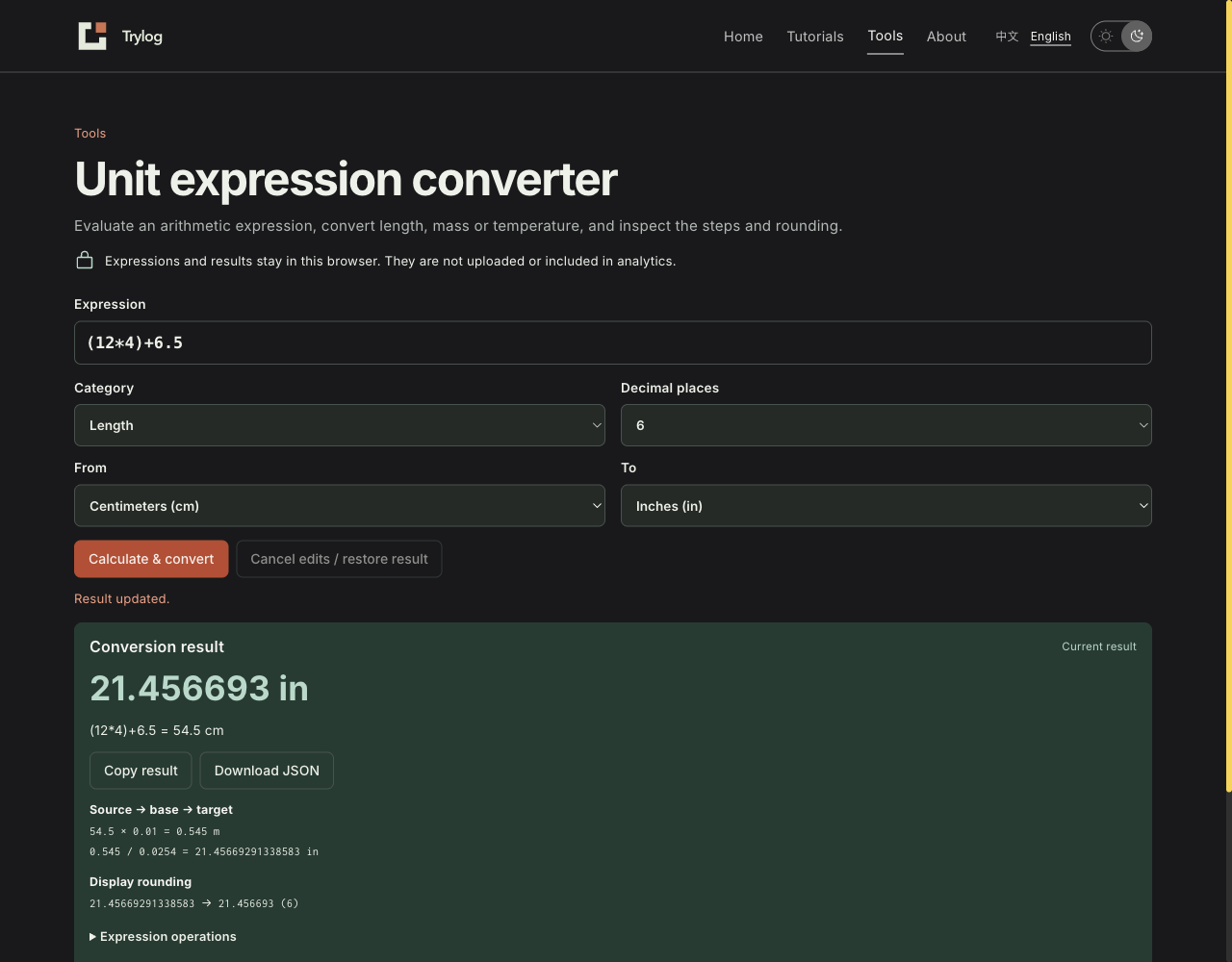
The expression, result and conversion steps share one workspace.
Establish what the expression means
The tool accepts plain decimals, + - * / and parentheses. Multiplication and division take precedence over addition and subtraction; operations at the same precedence run from left to right. Unary signs support -12.5, 2*-3 and -(2+3). .5 and 1. are accepted, but 1 2 cannot be joined into one number.
The default example records 12 * 4 = 48, followed by (12 * 4) + 6.5 = 54.5. This makes an incorrect left-to-right interpretation of the entire expression easier to spot. Other locally checked examples are:
| Expression | Value | What it checks |
|---|---|---|
-12.5 + 2.5 | -10 | Signed decimals |
2*-3 | -6 | A negative operand after multiplication |
8/4/2 | 1 | Consecutive division order |
2+3*4 | 14 | Multiplication precedence |
-(2+3)*4 | -20 | Parentheses and a unary minus |
The value of the entire expression receives the selected source unit. Choosing cm for (12*4)+6.5 means the resulting 54.5 is in centimeters. The tool does not infer dimensions for individual operands: 12cm*4+6.5cm is invalid, and 2m/3s is not interpreted as speed. Signed length and mass values can represent calculations such as coordinate differences; a negative result does not automatically describe a physical measurement.
The parser tokenizes permitted numbers and symbols, then recursively follows arithmetic precedence. It does not execute input with eval or Function. It rejects alert(1), 1e3, 0x10, 1,000, 2^3, 5%, 2(3) and incomplete input such as 1+. Limits are 256 characters, 128 tokens, 16 levels of parentheses or consecutive unary signs, and 64 operations. Exceeding a limit stops calculation.
Length and mass pass through a common base
Length uses meters as its base; mass uses kilograms. Conversion first multiplies by the source factor, then divides by the target factor:
base value = expression value × source-to-base factor
target value = base value / target-to-base factor
This version supports mm, cm, m, km, in, ft, yd and mi for length; mg, g, kg, and avoirdupois oz and lb for mass. Feet and miles use international definitions, not the U.S. survey foot. The ounce here is a mass unit, not a fluid ounce or a troy ounce.
NIST SP 811 Appendix B.8 lists SI conversion factors for these units. Its avoirdupois pound row displays a rounded value; footnote 22 gives the exact factor, 4.535 923 7 E-01 kg. The implementation uses the full 0.45359237, rather than copying the rounded table value 0.4535924 into the code.
| Unit | Base factor used by the tool |
|---|---|
| 1 in | 0.0254 m |
| 1 ft | 0.3048 m |
| 1 yd | 0.9144 m |
| 1 mi | 1609.344 m |
| 1 lb (avoirdupois) | 0.45359237 kg |
| 1 oz (avoirdupois) | 0.028349523125 kg |
Local tests checked 1 in → 25.4 mm, 1 ft → 0.3048 m, 1 mi → 1609.344 m and 1 lb → 0.45359237 kg. Exact unit definitions do not make every browser multiplication and division lossless: the decimal constants still enter binary floating-point arithmetic.
Temperature needs an offset: distinguish readings from differences
The length-and-mass multiplication pattern cannot be applied directly to temperature. 0 °C is 273.15 K; temperature scales differ in both interval size and zero point. This category converts absolute temperature readings. Entering 10 °C to represent a rise of 10 °C will instead be interpreted as an actual temperature reading of 10 °C. Temperature differences need a separate rule without the zero-point offset.
NIST’s temperature conversion table gives the exact Celsius, Fahrenheit and kelvin relationships. The tool uses K as its base, with these equivalent formulas:
°C → K: K = °C + 273.15
°F → K: K = (°F + 459.67) × 5 / 9
K → °C: °C = K − 273.15
K → °F: °F = K × 9 / 5 − 459.67
In the actual interface, 32 °F produced 273.150000 K, and −40 °F produced −40.000000 °C. The latter showed 233.14999999999998 K in its base step, exposing a binary floating-point tail. Changing the display to two decimal places and recalculating produced −40.00 °C while retaining the intermediate value.
Absolute zero is 0 K, equivalent to −273.15 °C and −459.67 °F. The tool checks the source reading against its minimum before conversion: −459.67 °F produced 0 K; −459.68 °F was rejected while the last valid result remained visible. Negative Celsius or Fahrenheit readings are allowed; readings below absolute zero are rejected. A same-unit conversion preserves the parsed value directly, avoiding a needless round trip through K.
Decimal places control the display; inspect the retained value
The tool uses JavaScript Number and, at ordinary magnitudes, toFixed to display 0–12 decimal places. It does not perform arbitrary-precision decimal arithmetic or infer significant figures or measurement uncertainty.
For 1/3 meters to meters, two decimal places display 0.33, while the retained browser result is 0.3333333333333333. At two places, 1.005 displays 1.00: the input decimal was first converted to a nearby binary value. This setting is unsuitable for financial decimal rounding. -.00001 displays 0.00 at two places; the tool removes negative zero from the display, while the raw target value in JSON remains -0.00001.
Large numbers have another limit. JavaScript parses 9007199254740993 as 9007199254740992. The tool warns when values exceed the safe integer range; more decimal places cannot recover the missing unit. At result magnitudes of 10²¹ or above, it uses Number scientific notation and states that fixed decimal places were not applied. Scientific notation remains unsupported in the input grammar.
Division by zero is rejected. There are also rejection guards for non-finite values and a nonzero value underflowing to zero during parsing or conversion. A product involving 240 decimal digits and a conversion of a 250-digit length remained finite in the tests; a long number alone is not evidence of overflow. A 309-digit literal hit the 256-character limit first. This run did not reach every floating-point extreme through interface samples, and it does not establish exact arithmetic for arbitrary extreme inputs.
Edits, errors and exports follow the visible result
After a successful calculation, changing units or decimal places marks the output as the last valid result until recalculation. Blank input and 1/0 do not erase it. “Cancel edits / restore result” restores the expression, category, source and target units, and decimal places together, so an exploratory change has a clear way back.
Copy and download always use the result shown in the panel. When uncalculated edits exist, copied text says “Last valid result” and JSON includes stale: true; new inputs are not silently paired with an old answer. The stale result JSON actually downloaded after division by zero still contains (12*4)+6.5, 54.5 cm and 21.456693 in. After restoring, converting −40 °F and choosing two decimal places, the temperature JSON contains the current result with stale: false.
{
  "expression": "-40",
  "category": "temperature",
  "source": "f",
  "target": "c",
  "decimals": 2,
  "expressionValue": -40,
  "baseValue": 233.14999999999998,
  "result": -40,
  "display": "-40.00",
  "stale": false
}
This excerpt shows the key fields. The full file also includes the base unit, arithmetic and conversion steps, numeric model and tool version. JSON is an inspection snapshot, not an import format for restoring a session. Inputs and results are not put in URLs, local storage or analytics, or sent to a server; loading static page resources is separate from calculation. Closing the page ends the in-memory session.
Public claims and this implementation provide different evidence
Metriqcon describes conversion with live expressions. Its length page advertises 11 units and up to 10 significant digits, with examples including (12*4)+6.5, 25*2.54 and 3^2. It also states that calculation is local and inputs do not leave the device. These are public claims I read. This run did not test all of its syntax, precision or network behavior, or establish its advertised uniqueness.
This tool takes a smaller scope: three categories of scalar units, four arithmetic operators, inspectable steps and local JSON. It is useful for converting a same-unit expression from a development or measurement note while keeping its context. Temperature differences, compound dimensions, financial rounding and arbitrary precision require their own calculation methods; selecting a unit on this page does not supply them.