How to evaluate a coding-agent router with quality, cost, and time
Read Weave Router's public pass@2, per-trial cost and time, check versions and licensing, and reuse a task, cache, and failure comparison record.
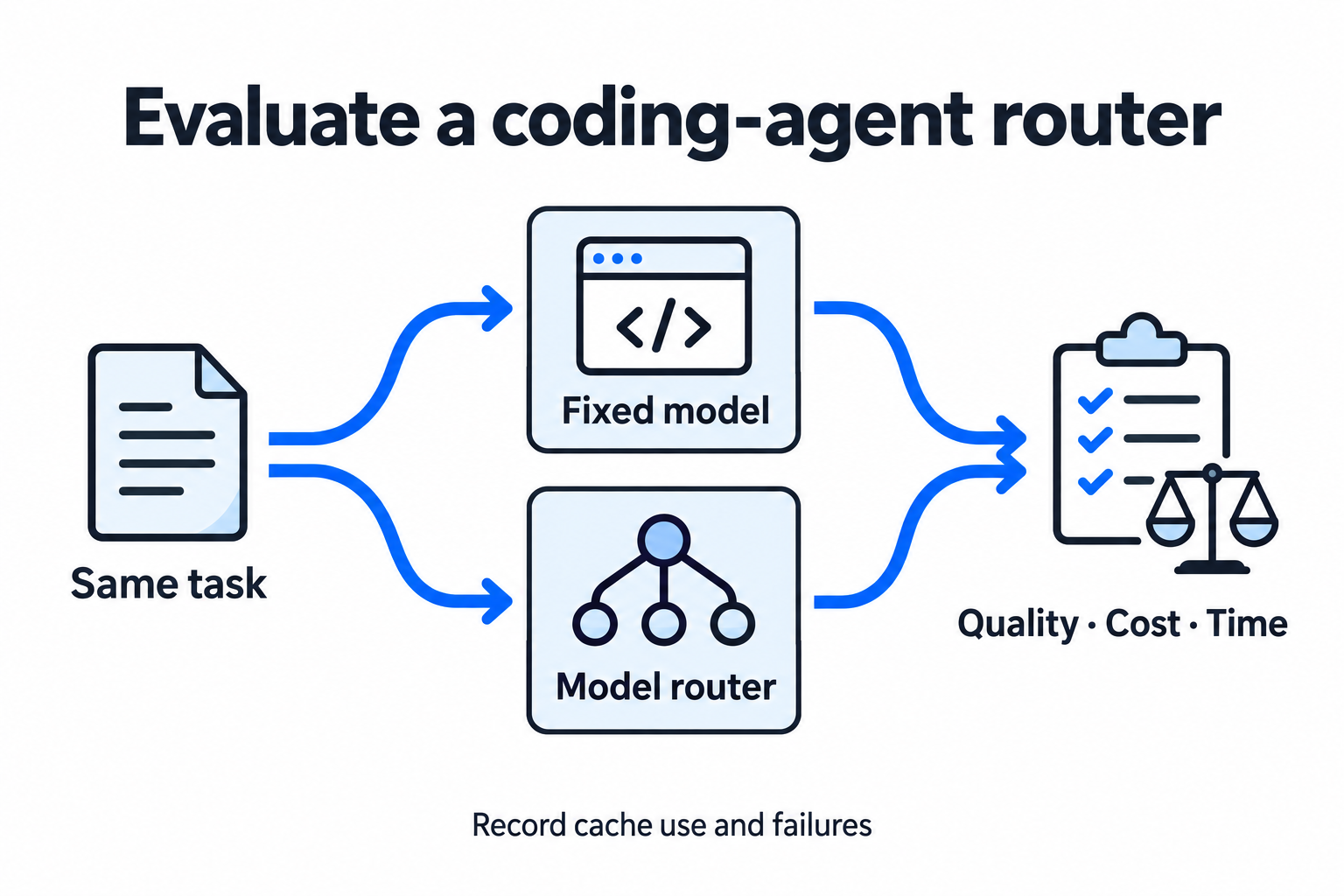
Compare accepted artifacts, cost, and time together, recording cache use and failures.
Switching a coding agent from a fixed model to an automatic router is usually meant to reduce spending and waiting. The useful comparison is how many acceptable results the same tasks produce, and how much money, time, and human rework those results require. More cheap requests do not necessarily make a complete task cheaper.
Weave Router’s public page presents this question through Quality, Cost, and Speed tabs. For this article, we viewed the English website, public repository, and benchmark documentation, then organized the disclosed metrics into a reusable comparison record. The scores and costs below come from the project. We did not run paid model tests or change an existing coding agent’s routing configuration.
Read the two task sets separately
The website says Router and GPT-6 Astra used the same Codex harness and tasks, with two attempts per task, paired on the same day and package. Quality is pass@2: a task counts as solved if either attempt passes. Cost and time are displayed per trial.
| Public quality metric | Terminal-Bench 4.0 | SWE-Atlas |
|---|---|---|
| Tasks | 66 terminal-workflow tasks | 124 codebase Q&A tasks |
| Weave Router pass@2 | 62.1% | 62.1% |
| GPT-6 Astra pass@2 | 60.6% | 66.1% |
| Task difference described on the site | Router solved 1 more | Router solved 5 fewer |
| Difference from displayed scores | +1.5 percentage points | −4.0 percentage points |
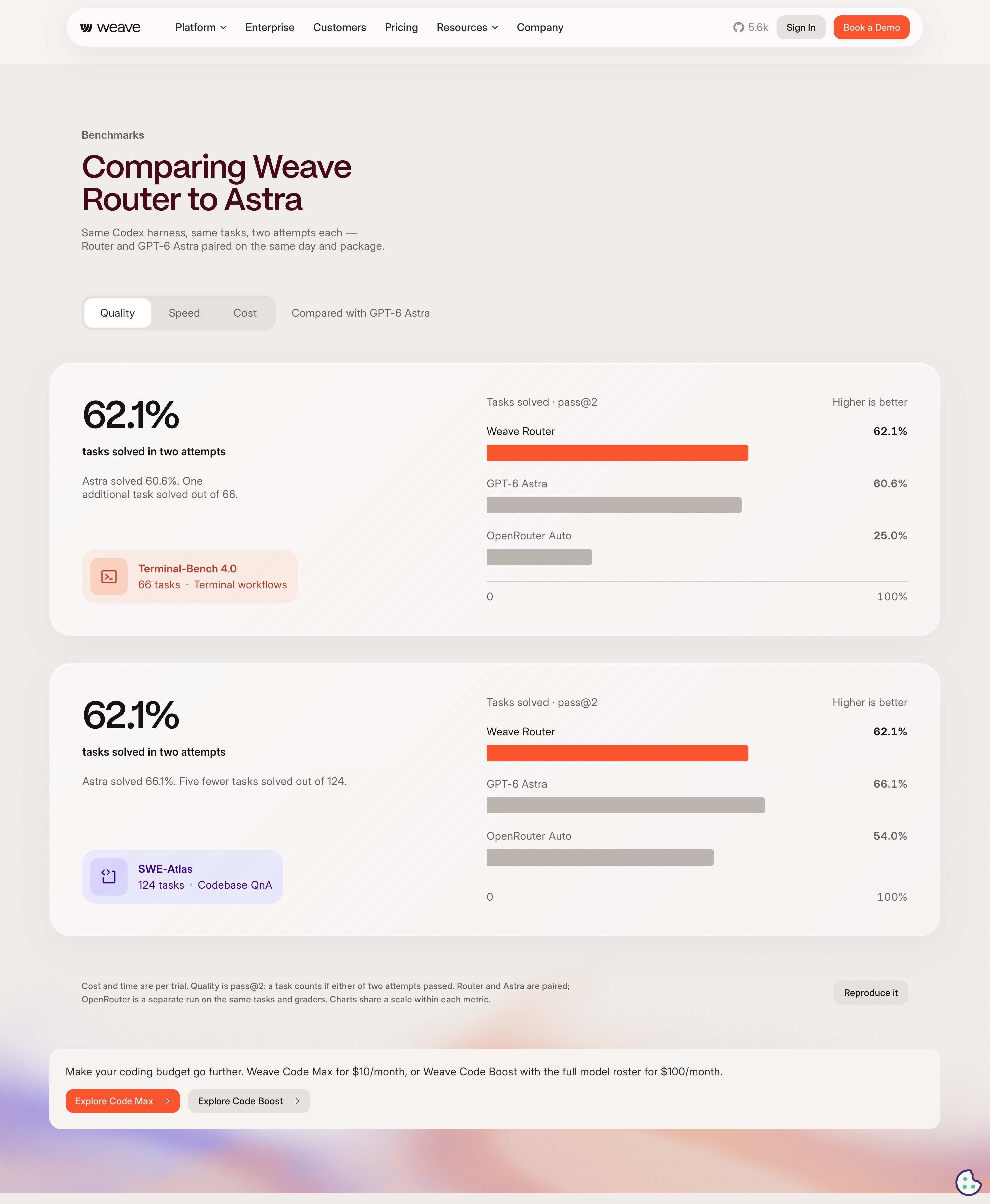
The two sets point in different directions: one more terminal task, five fewer codebase Q&A tasks.
The two sets point in different directions. Router solved one more task in this Terminal-Bench batch; Astra solved five more in SWE-Atlas. Those point estimates cannot establish equivalence across coding work, or show whether the differences exceed sampling variation. Paired task-level outcomes, repeated runs, and uncertainty intervals are needed to discuss an acceptable quality loss defined in advance.
Pass@2 is also different from success on the first attempt. One system may often need a second try while another finishes immediately, yet their combined task scores can look similar. If your workflow allows only one attempt, compare pass@1. If retries are allowed, include their cost, time, and final artifacts.
In the original Show HN post, the author introduced Router 2.0 with “equivalent pass rate” and reported costs at 52% of Astra for Terminal-Bench and 54% for SWE-Atlas. The current website supplies more specific scores for the two task sets. This article uses its current absolute figures; the older post remains an attributed launch statement.
Identify the denominator for cost and speed
The current Cost tab lists $5.22 versus $10.03 per trial for Terminal-Bench, and $2.31 versus $5.04 for SWE-Atlas, with Router first in each pair. Calculated from those figures, Router costs approximately 52% and 46% of Astra, or approximately 48% and 54% less. “54% of the cost” and “54% less cost” are materially different claims, so preserve the denominator when quoting them.
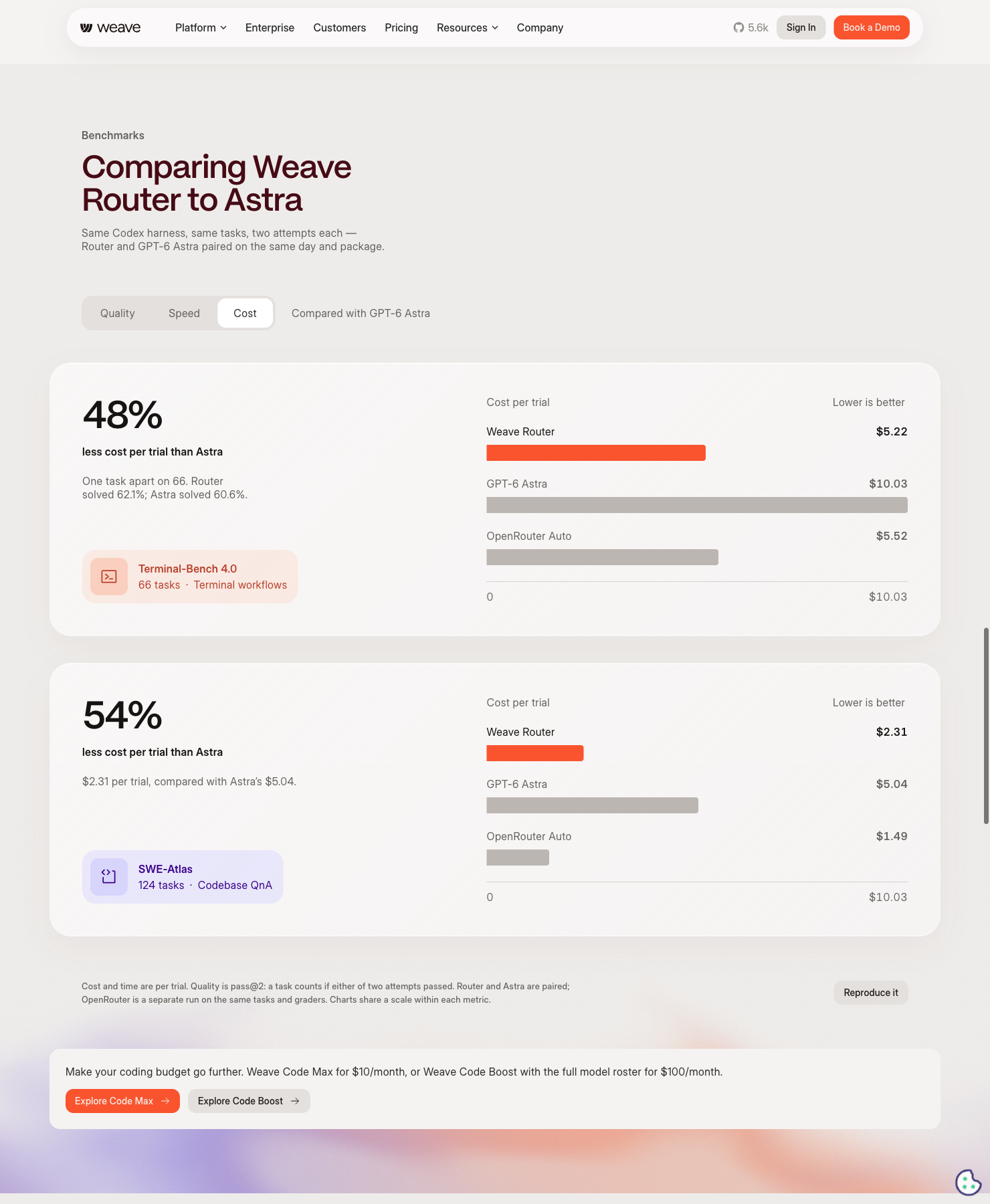
The Cost tab shows spending per trial; the footnote defines quality separately as pass@2.
The Speed tab lists 20.5 versus 44.1 minutes per trial for Terminal-Bench, and 6.8 versus 16.7 for SWE-Atlas. The page summarizes these ratios as about 2.2× and 2.5× faster. They describe trials in these benchmarks. They do not directly measure a whole project that includes queues, concurrency, environment setup, and human review.
The site also shows OpenRouter Auto. Its footnote says this was a separate run with the same tasks and graders, while Router and Astra were paired. A shared chart does not remove that experimental-design difference.
The public benchmark README distinguishes three cost sources. Router’s analytics export supplies router-billed cost calculated using catalog prices and cache semantics. Direct-model cost is a list-price estimate from Codex usage and a price table. OpenRouter uses its returned usage.cost. The document explicitly says router-billed is not an OpenAI invoice, and the direct estimate cannot see cache writes absent from client-side usage. Router-billed fields remain blank without analytics access or a saved export.
Choose a cost basis before rerunning a comparison. To assess cash spending, retain invoices and additional charges. To compare resource use, also record tokens, a price snapshot, and the estimation method. Track router fees, fixed subscriptions, self-hosting resources, and judge costs separately, then total them. Catalog pricing for one arm and an actual bill for another require explanation.
Cache use changes the value of switching models
Coding-agent sessions accumulate conversation history, tool output, and file context. Switching models or providers may prevent reuse of an existing cache. Rebuilding a large context to save on one request can cancel out its cheaper unit price. A bad choice may also trigger failure, escalation, and another attempt.
Weave’s website describes cache-aware switching and escalation after failure as routing mechanisms. These are the project’s descriptions. Its public README says the default self-hosted stack uses an in-process cluster scorer; the frozen HMM sidecar is optional, and the router still makes the final model selection. Installing the client alone does not establish that you are running the same policy evaluated on the website.
The benchmark documentation also notes that OpenRouter’s Responses route requires request-level cache_control. Missing that marker changes cache use and cost. Router cost can include cache writes, while the direct estimate may not see them. Separate cold-cache and warm-cache trials, recording cache reads, cache writes, uncached input, output tokens, model switches, and actual served models. Keep unavailable values unknown rather than entering zero.
Pin the version and the licensed object
We checked client tag router-v0.2.28 at commit d1dc0b78efef18a3631d0f44801c9a4ef1fab6e5, and main commit 4387a1acd6446aa60ccb64bba3faca2b8a5ac87a. Both LICENSE files are Apache 2.0. Their README says the Apache 2.0 release line starts at router-v0.2.24 and npm 0.2.24; older tags and published packages retain the licenses shipped with them.
The website still said “Elastic License 2.0 to self-host” during this reading. It did not identify a specific tag, component, or download for that sentence. We therefore cannot combine it with a pinned repository LICENSE into one current licensing conclusion. Check the terms and notices attached to the exact distribution you intend to deploy.
THIRD_PARTY.md separates project code, dependencies, model weights, and datasets. The npm installer does not bundle the server or model weights. The HMM sidecar documentation describes downloading and hash-verifying a public frozen package, while excluding training, online learning, and internal registry systems. That v1 package also requires a compatible Google embedding. Public source code, a downloadable frozen artifact, and the hosted Router 2.0 training and serving policy have different scopes. This reading cannot establish that they are identical.
Align your own tasks with one record
Start with a small set representative of daily work: fixing a known failing test, implementing a defined requirement, or explaining existing code. Fix the repository commit, inputs, and acceptance criteria, then run baseline and router in separate environments so one arm’s edits cannot affect the other. Keep tools, permissions, attempt counts, budgets, and timeouts aligned. Record model parameters that must differ.
| Record group | What to retain for each attempt |
|---|---|
| Task and environment | task_id, requirement and input hashes, repository commit, environment image, harness and grader versions |
| Router and models | baseline/router, policy and package digest, actual model/provider/version, reasoning settings, fallbacks and switches |
| Execution limits | attempt, repetition or seed, tools and permissions, budget, timeout, run order, concurrency |
| Quality | test command and exit code, artifact path, acceptance decision, human edits, failure type |
| Cost | input/output and cache-read/write tokens, price snapshot, billed or estimated cost, retries, service/resource/judge fees |
| Time and logs | start/end, end-to-end duration, first-token/inference time when available, cold/warm cache, log path |
This record connects spending to artifacts. Separate environment startup failure, model refusal, tool failure, timeout, and incorrect answers. Report all tasks first, then provide additional analysis using rules written in advance. Dropping only Router’s difficult failures, or retaining only tasks both arms solved, biases the comparison toward an easier surviving sample.
The two-arm template below has not been run. Copy it into your own record. not_run is an execution status and unknown means data is unavailable; neither denotes a failed test or zero spending.
| Field | baseline | router |
|---|---|---|
| task_id | Your task ID | The same task ID |
| attempt | 1 | 1 |
| Execution status | not_run | not_run |
| Acceptance | unknown | unknown |
| Total cost USD | unknown | unknown |
| End-to-end minutes | unknown | unknown |
| Cache reads/writes | unknown | unknown |
| Failure type | unknown | unknown |
| Log path | To fill in | To fill in |
When aggregating, retain trial pass rate, task pass@1/pass@2, paired wins/ties/losses, and the quality difference. One useful cost measure is total spending across all attempts and additional charges divided by accepted tasks. Failed attempts stay in the numerator. With no accepted tasks, the measure has no usable finite value. For time, report median and p90 end-to-end task duration separately from the whole batch’s wall-clock duration, stating concurrency. Record human review and correction minutes separately when they matter.
Define your acceptable quality loss and budget before expanding a test. A router suitable for code explanation may perform differently on consequential fixes. Savings in one batch may not cover cache rebuilding for longer contexts in the next. Keeping tasks, versions, artifacts, and logs makes the comparison repeatable after the model pool or policy changes. Find more concrete tools and verification methods in Trylog tool reviews.