Integrate FLUX 3 Image Klein with distilled weights and prompt upsampling
Select the 16-step distilled checkpoint and preserve default prompt upsampling when integrating FLUX 3 Image Klein into your image pipeline.
When integrating FLUX 3 Image Klein, choose the distilled checkpoint for generation and editing and keep the pup prompt upsampler. It expands a short request into a full scene caption; the reference CLI, demo, and Python generate function enable it by default. This guide follows the official BFL repository to explain component loading, reference images, and layout boxes. No installation, model inference, or paid API call was performed.
Component Architecture and Checkpoint Roles
Before sizing GPU workers or writing initialization logic, it helps to clarify what the model parameter count actually covers. According to the FLUX 3 Image Klein model card, the 5.6B parameter label refers strictly to the image transformer; the text encoder is separate, and the prompt upsampler loads as its own component. Memory budgets and weight caching scripts cannot be estimated from a single 5.6B backbone footprint alone.
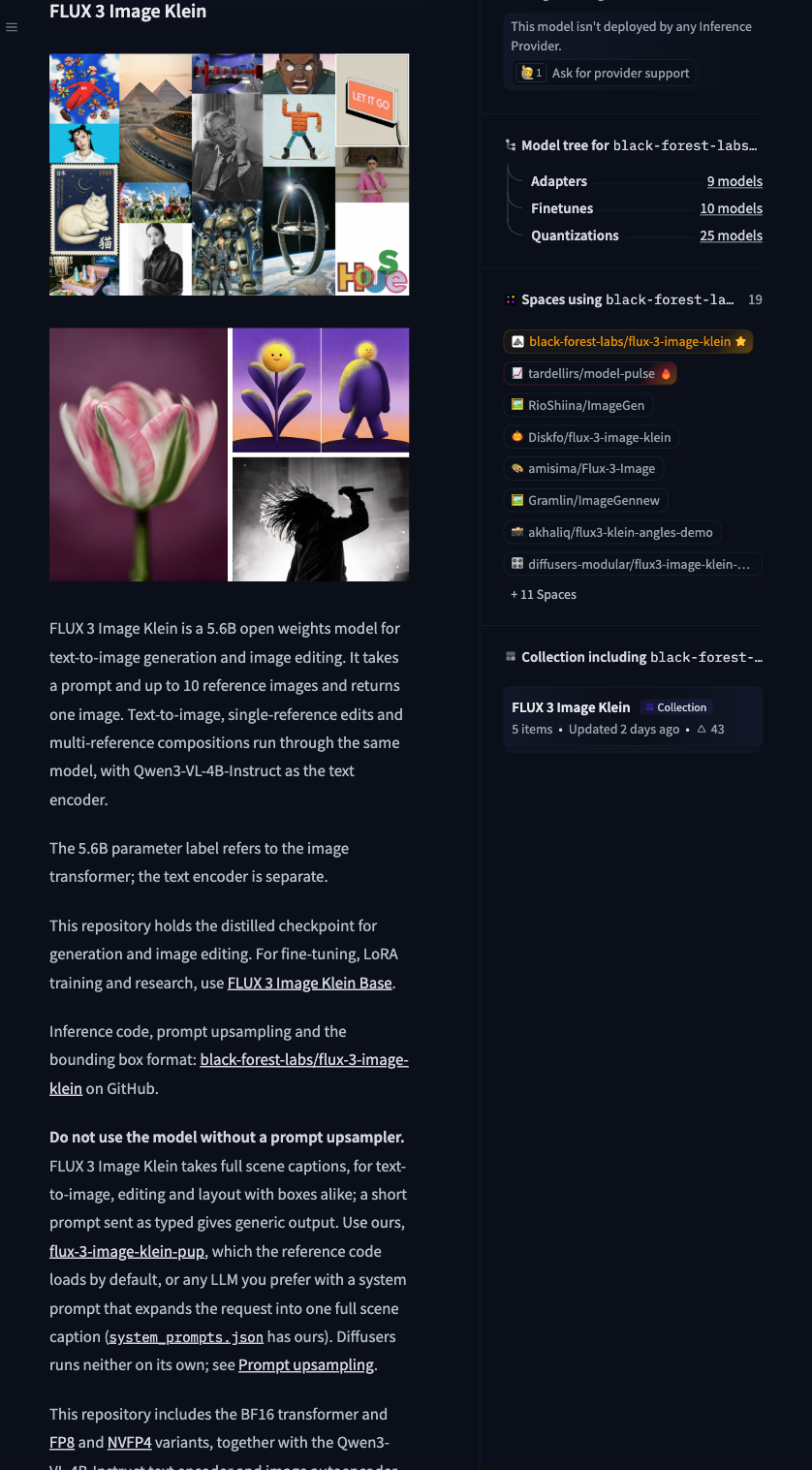
The official FLUX 3 Image Klein model card describes its components and prompt upsampling.
The distilled checkpoint is intended for generation and editing, defaults to 16 steps without CFG, and accepts up to 10 reference images per request. Base is intended for fine-tuning and research. The examples below keep the distilled defaults.
Why Prompt Upsampling Must Remain Enabled
In the official black-forest-labs/flux-3-image-klein GitHub repository, the authors state plainly regarding the prompt upsampler: “do not use the model without it.” Consequently, the reference CLI script, interactive demo, and Python generate function all enable prompt upsampling by default.
The upsampler turns a short request into a fuller scene caption before image sampling. The authors warn that raw short prompts produce weaker results. If both components do not fit in memory together, run the upsampler separately and pass its caption to the image model. Use --no-pup only when a complete scene caption has already been supplied.
Prerequisites and Reference Code Examples
According to the reference installation instructions, running the open-weight code requires a Hugging Face account that has accepted the gated weight terms, a compatible CUDA GPU, and Python 3.12. All code blocks below are documentation examples from the official README; we did not perform a local installation, execute model inference, or invoke paid API endpoints.
For command-line verification or batch scripts, the official README provides the following CLI command:
python scripts/cli.py "A man walking with his dog, afternoon sun" --model distilled --out out.png --seed 7This invocation explicitly selects --model distilled with a fixed --seed 7 and omits --no-pup, leaving the default prompt upsampler active.
When embedding the workflow into a Python application, use the Models and generate interfaces from flux3.generate. The following exact documentation example from the official README initializes both the distilled transformer and the pup upsampler, then runs a text-to-image pass followed by a single-image editing pass:
from PIL import Image

from flux3.generate import Models, generate
from flux3.pipeline import WEIGHTS, dit_path

models = Models({"distilled": str(dit_path("distilled"))}, pup=str(WEIGHTS / "pup"), pup_memory=0.35)

image, record = generate(models, "distilled", "a red bicycle leaning on a white wall", images=[], seed=1)
image.save("bicycle.png")

image, record = generate(models, "distilled", "put a red bandana around the dog's neck",
                         images=[Image.open("examples/inputs/3.png")], seed=22)
image.save("bandana.png")
Here, Models loads the distilled checkpoint alongside pup=str(WEIGHTS / “pup”) with pup_memory=0.35. The first generate call passes an empty list images=[] for pure generation, while the second passes a list containing one opened PIL.Image instance for instruction-based editing (up to the 10-image limit), returning both the output image and the execution record.
Coordinate Normalization and Memory Headroom
If your integration passes bounding boxes for spatial layout guidance, pay close attention to coordinate ordering and scale. Reference-code boxes in FLUX 3 Image Klein use normalized [y_min, x_min, y_max, x_max] coordinates in the 0..1 range with a top-left origin. Notice that vertical coordinates (y) precede horizontal coordinates (x). Do not mix this format with centered pixel coordinates used by other frameworks or internal 0..1000 integer prompt boxes. For a broader look at preventing coordinate transformations and numerical drift across rendering pipelines, see our multiscale WebGL coordinate precision guide. Additionally, the official model card notes that boxes guide layout rather than imposing hard pixel masks; avoid promising hard pixel-masked inpainting to downstream users based on launch marketing phrasing.
When provisioning GPU memory, the official README reports vendor peak memory measurements on an NVIDIA B200 GPU at 1024×1024 resolution for the distilled model without the upsampler: 31GB in BF16, 26GB in FP8, and 25GB in NVFP4. Keep two constraints in mind when reading these numbers: first, they are vendor measurements on B200 hardware rather than universal minimums across all GPUs; second, they measure the reference invocation without the prompt upsampler loaded. Because production integrations should retain pup, your VRAM allocation must leave extra headroom above those figures to accommodate the upsampler (pup_memory=0.35 in the reference snippet) rather than treating the table as a measurement of the image transformer alone or a minimum for other GPUs.
Licensing Boundaries and Integration Checklist
Before shipping an integration, verify licensing terms against your deployment model. While the reference code in the repository is licensed under Apache-2.0, the model weights are governed by the FLUX Kommunity License. Commercial use is conditional under this weight license, so review the exact FLUX Kommunity License terms rather than treating the weights as unrestricted open-source software.
To finalize your integration, run through these concrete verification steps in your codebase:
- Audit model initialization: Confirm that Models(…) explicitly points pup to the upsampler weights directory and that wrapper scripts only permit
--no-pupwhen an upstream service guarantees pre-expanded captions. - Validate input schemas and return records: Inspect the record returned by generate during staging tests to verify prompt expansion is occurring, enforce a maximum length of 10 items on the images array, and confirm that the wrapper uses the distilled sampling defaults.
- Add bounding-box assertions: Write unit tests for layout inputs that assert 0 <= y_min < y_max <= 1 and 0 <= x_min < x_max <= 1 with a top-left origin, rejecting unnormalized pixel values or swapped [x, y] axes before they reach the inference worker.