Multiscale WebGL coordinate precision: local rebasing and layered coordinates
An original WebGL 2 experiment measures float32 drawing errors with a 64-point ring, tests local rebasing limits and buffer reuse with 60,000 points, and includes source code and raw frame CSV.
Place a radius-96 ring near world coordinate 1e9, then move the camera to its center. The ring should still look like a ring. In my small WebGL 2 experiment, uploading global positions as a Float32Array left only a few grid points: 64 vertices collapsed into 12 distinct GPU positions, with a maximum position error of 78.81921 drawing-buffer pixels.
Subtracting the local origin on the CPU, before conversion to float32, restored all 64 positions in the same sample. Maximum error fell to 0.00000868 pixels. That fixed this coordinate problem. A separate test with 60,000 points showed that reusing a buffer removed per-frame rebuilding and upload work, while browser frame intervals did not consistently improve. Those two problems need separate measurements.
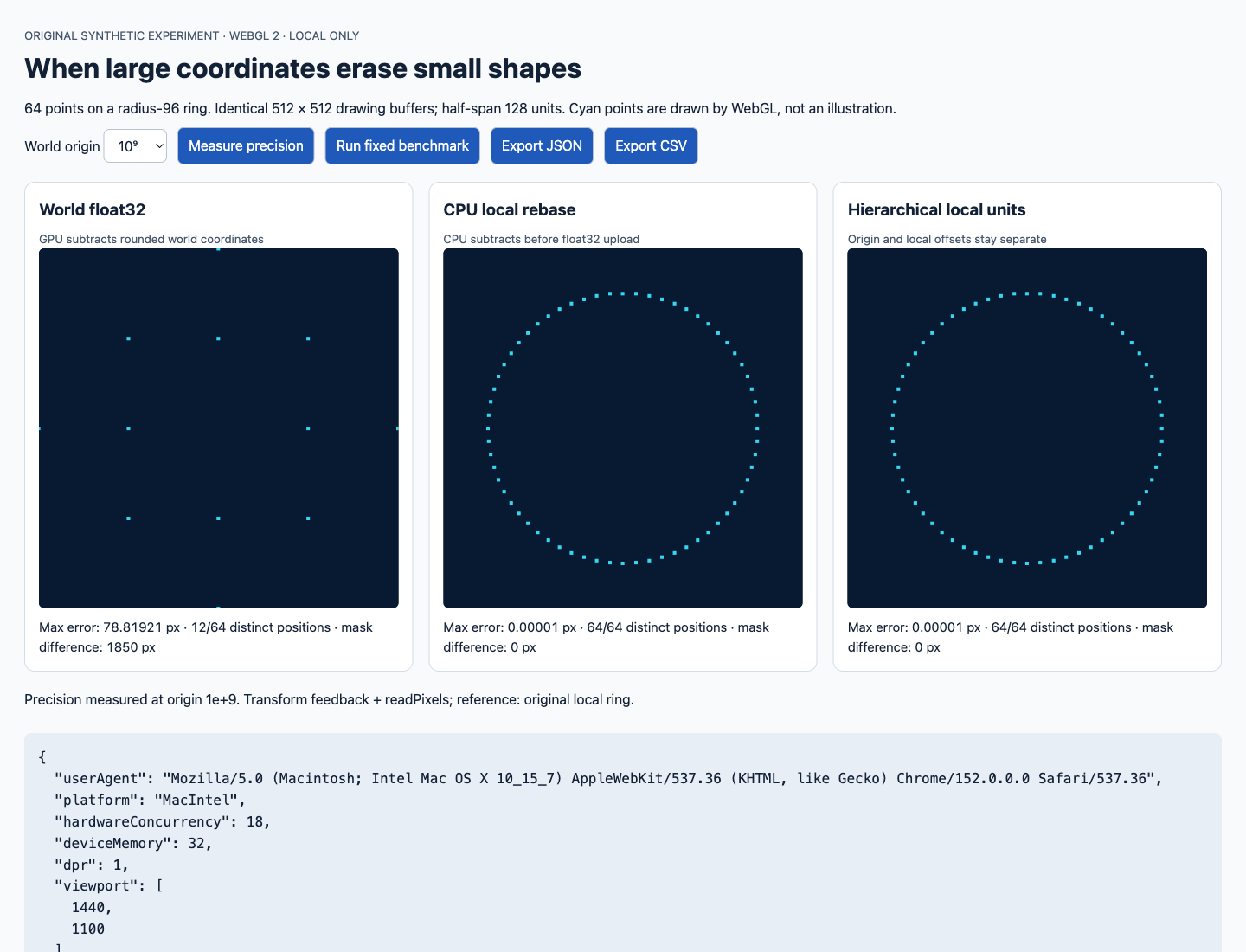
Identical 512 × 512 drawing buffers, with the world origin at 10⁹. WebGL actually draws the cyan points.
This note is for developers building maps, CAD views or visualizations spanning different scales. It helps locate where small geometry loses detail inside large coordinates, and why restoring that detail may leave frame pacing unchanged. The topic came from a WebGL demonstration that zooms outward from Earth. Its author reported mobile performance problems. The code, geometry and measurements below are an independent synthetic experiment; they use neither that project nor its astronomical catalog.
Choose a fixed sample that exposes the error
The ring has 64 points. Its local positions are:
const angle = 2 * Math.PI * i / 64;
const local = [96 * Math.cos(angle), 96 * Math.sin(angle)];
const world = [origin + local[0], origin + local[1]];
Both origin components have the same value: 1e3, 1e6, 1e9, 1e12 or 1e20. The camera stays centered on that origin, with a half-span of 128 units. The reference ring therefore has a screen radius of 192 pixels. Each canvas uses a fixed 512 × 512 drawing buffer, point size 5 and no antialiasing. CSS scaling is excluded from the error unit.
The machine was an Apple M5 Max with 128 GiB of physical memory, running macOS 27.0. Ego Lite used Chromium 152, with ANGLE Metal Renderer: Apple M5 Max. The desktop viewport was 1440 × 1100, with test DPR set to 1. The browser reported deviceMemory=32; that value and installed RAM are recorded separately. The vertex shader’s HIGH_FLOAT query returned rangeMin=127, rangeMax=127 and precision=23.
Query getShaderPrecisionFormat on the device you actually target. Declaring highp retains the precision available to the shader; rounding that already happened during buffer conversion remains in the input.
The subtraction point determines what survives
All three paths use the same vertex shader, with different input buffers and uniforms:
#version 300 es
precision highp float;
in vec2 a_position;
uniform vec2 u_origin;
uniform float u_halfspan;
out vec2 v_clip;
void main() {
  v_clip = (a_position - u_origin) / u_halfspan;
  gl_Position = vec4(v_clip, 0.0, 1.0);
  gl_PointSize = 5.0;
}
The world-float32 path writes origin + local into a Float32Array, then subtracts the uniform origin on the GPU. The CPU-rebased path computes world - origin using JavaScript Number before converting to float32; its GPU origin is zero. The layered local path keeps an independent anchor and local offsets. In this sample it uploads local / 128 directly, using GPU origin zero and half-span 1.
Consider the second vertex’s x component. The reference local value is about 95.5377337605. Near 1e9, the world-float32 buffer contains 1000000064, leaving 64 after GPU subtraction. CPU rebasing uploads about 95.5377349854. The local layer uploads about 0.7463885546. The loss is already visible at the buffer boundary.
Binary float32 has 24 bits of significand precision. For normal values in [2^e, 2^(e+1)), adjacent values are separated by 2^(e-23). Since 1e9 lies between 2^29 and 2^30, that spacing is 64. Several vertices of a radius-96 ring fall onto the same grid positions. A different projection matrix cannot reconstruct the coordinates that merged during conversion.
Read GPU positions and final pixels
Before linking the program, I register v_clip with transformFeedbackVaryings. After executing the vertex shader, getBufferSubData reads all 64 clip-space positions. This uses transform feedback from the WebGL 2 specification. Position error is calculated as:
const dx = (gpuClipX - localX / 128) * 256;
const dy = (gpuClipY - localY / 128) * 256;
const errorPixels = Math.hypot(dx, dy);
I then disable RASTERIZER_DISCARD, draw the points and read colors with readPixels. A binary mask of the cyan pixels is compared against the local-layer path. The mask tells us which final pixels change, while position error retains differences smaller than a pixel.
| World origin | World float32 max error / px | CPU rebase max error / px | Local layer max error / px |
|---|---|---|---|
| 10³ | 0.00016023 | 0.00000868 | 0.00000868 |
| 10⁶ | 0.07454506 | 0.00000868 | 0.00000868 |
| 10⁹ | 78.81921478 | 0.00000868 | 0.00000868 |
| 10¹² | 192.00000000 | 0.00016023 | 0.00000868 |
| 10²⁰ | 192.00000000 | 192.00000000 | 0.00000868 |
At 1e9, the world-coordinate path differs from the reference mask by 1,850 pixels. CPU rebasing differs by zero pixels. At 1e12, the world-coordinate path collapses into one position, while the CPU path still has 64. The world-coordinate path at 1e6 has roughly 0.075 pixels of error but the same mask in this test. Visible changes depend on whether points cross raster boundaries, so matching screenshots can still conceal coordinate error.
Reading precision results synchronizes GPU/CPU work and belongs in a separate diagnostic pass. The frame benchmark performs neither transform-feedback readback nor readPixels.
Rebasing after assembling 10²⁰ is already too late
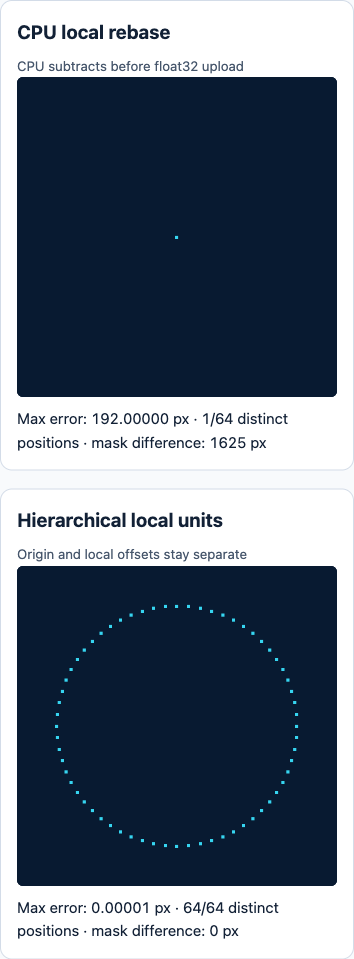
At 10²⁰, CPU rebasing also has a maximum error of 192 pixels.
JavaScript Number uses IEEE 754 binary64. Adjacent binary64 values near 1e20 are 16,384 apart, much farther than the ring’s radius of 96. The detail disappears when evaluating world = 1e20 + local: every world - 1e20 in this sample becomes zero. Later float32 conversion and highp pass that zero along.
When data spans many orders of magnitude, retain its hierarchy in the data model. A large-scale anchor can identify a branch, while the child stores small geometry in its own units:
const layer = {
  anchor: { id: "synthetic-root", origin: "1e20" },
  halfspan: 128,
  positionsLocal: localCoordinates  // Float64Array, roughly -96..96
};
const gpu = Float32Array.from(layer.positionsLocal,
  value => value / layer.halfspan);
The large origin is stored as a string to preserve the scene label. Rendering this branch never parses it and adds it to every vertex. The camera and object share an anchor in this experiment, with camera-local offset zero. This tests the local representation of one branch. Distant branches, accumulated parent-child transform error and continuous interpolation between layers require their own registration and transition tests.
A full transition can first compute (object offset - camera offset) in a common parent’s units, then project child-local values using the scale ratio. Work in a shared frame with controlled magnitudes, instead of repeatedly constructing enormous world positions for leaf vertices. The download’s layer-sample.json retains the anchor, local units, reference geometry and intermediate inputs for all three paths.
Measure buffers and frame pacing separately
The performance sample contains 60,000 two-dimensional points produced by the same generator, within radius 96. A two-component float32 buffer occupies 480,000 bytes. Each strategy warms up for 30 frames and records 120 frames. There are two repetitions, with the second using the reverse strategy order to reduce fixed-order effects. Drawing-buffer size, shader, point size and camera parameters stay fixed.
The strategies are world-buffer reuse, CPU rebasing and bufferSubData every frame, one-time CPU rebasing followed by reuse, local-layer buffer reuse, and drawing only the first 6,000 local-layer points. The last case deliberately changes the displayed content. It is a point-count load experiment, and needs separate visual quality criteria before use as an optimization. It still allocates the full 480 KB buffer; it measures fewer drawn points rather than lower memory use. The world-float32 row already renders distorted geometry, so its timing serves only as an incorrect baseline. Compare the two CPU-rebased paths when assessing rebuilding versus reuse.
performance.now() wraps optional coordinate rebuilding and upload, clearing, drawArrays and flush. I call that CPU submission time. Separately, adjacent requestAnimationFrame callback timestamps provide frame intervals. All values below are milliseconds; p95 is the sorted sample at position ceil(0.95 × n).
| Strategy | CPU median: runs 1 / 2 | CPU p95: runs 1 / 2 | rAF median: runs 1 / 2 | rAF p95: runs 1 / 2 |
|---|---|---|---|---|
| World float32, reuse, 60k points | < 0.1 / < 0.1 | 0.1 / 0.1 | 16.7 / 16.7 | 33.4 / 33.3 |
| CPU rebase, rebuild each frame, 60k | 0.4 / 0.3 | 0.7 / 0.5 | 16.7 / 16.7 | 33.4 / 33.4 |
| CPU rebase, reuse, 60k | < 0.1 / < 0.1 | 0.1 / 0.1 | 16.7 / 16.7 | 33.4 / 33.3 |
| Local layer, reuse, 60k | < 0.1 / < 0.1 | 0.1 / 0.1 | 16.7 / 16.8 | 33.4 / 33.4 |
| Local layer, draw only 6k | < 0.1 / < 0.1 | 0.1 / 0.1 | 16.7 / 33.3 | 33.3 / 33.4 |
Several raw CPU medians are 0, with the browser clock exhibiting steps of approximately 0.1 ms. The table uses < 0.1 for readings below this run’s effective timing resolution. Per-frame rebuilding allocates another coordinate array and uploads 480 KB every frame; it produced more measured CPU work here. Frame intervals show no stable difference between strategies. In the second run, drawing fewer points actually had a median of 33.3 ms.
The test ran in a desktop browser session, with the tab remaining visible, without isolating other system or browser activity. These measurements support a reduction in submission work for this sample. They leave the source of the longer frame intervals unresolved and provide no measured old-phone frame-rate improvement.
requestAnimationFrame supplies timestamps from browser refresh scheduling. flush submits commands without waiting for GPU completion, so the two timing measurements above retain their respective names. This environment exposed EXT_disjoint_timer_query_webgl2, which the experiment did not use. A next GPU-time measurement would retrieve query results asynchronously and check the disjoint state.
Connect a precision budget to layer selection
For normal float32 coordinates, estimate the ULP at the local coordinate magnitude, then multiply by drawing-buffer pixels per world unit. In this experiment each unit covers 2 pixels, while the ULP near the world origin is 64: the rounding grid spans many pixels. Around local value 100, float32 ULP is approximately 7.6e-6 units. That budget helps choose tiles, anchors and local units. Read back the actual shader results afterward, particularly when the projection includes further transforms.
Once a buffer stores positions relative to an object anchor, small camera movements can usually be handled with bounded uniforms. Update the buffer when geometry changes, the anchor changes or a new layer loads. This makes rebuilding event-driven. Subtracting an origin in the shader from global float32 positions retains the shape that conversion already quantized.
When zooming out makes many points share pixels, design a coarse layer and validate its screen-space error separately. Align fine and coarse layers under the same camera and pixel units, and use hysteresis around switching thresholds to prevent rapid toggling. The 6k case here measured only a change in draw count. Representative-point selection, transition continuity and visual error tolerance depend on the actual content.
Download and repeat the experiment
Download the original minimal project and raw measurements ZIP. It contains index.html, lab.js, an MIT license, the layer sample, desktop JSON and a CSV with all 1,200 measured frames. The code has no external dependencies or upload path.
Extract the archive and start a local static server from its directory:
python3 -m http.server 4343 --bind 127.0.0.1Open http://127.0.0.1:4343. Select 10⁹ and 10²⁰ to inspect the ring, then click Run fixed benchmark. Keep the tab in the foreground and export JSON and CSV when it finishes. When comparing machines, retain browser version, renderer, viewport, drawing-buffer dimensions, point count and raw frames. I also checked the page and drawing in a desktop browser with a 390 × 844 narrow viewport; the drawing buffers stayed at 512 × 512. That check covers layout and the same desktop GPU.
The experiment gives a concrete starting point: check whether positions have already merged before upload. CPU rebasing is a simple option when binary64 still retains the differences. If assembling world positions already loses those differences, preserve local layers in the data model. After restoring coordinates, use independent submission and frame measurements to choose the next optimization.