JSON to CSV: choose columns and make the boundaries explicit
Convert nested records locally with explicit JSON Pointer columns, exact numeric tokens, missing-value counts and spreadsheet formula protection.
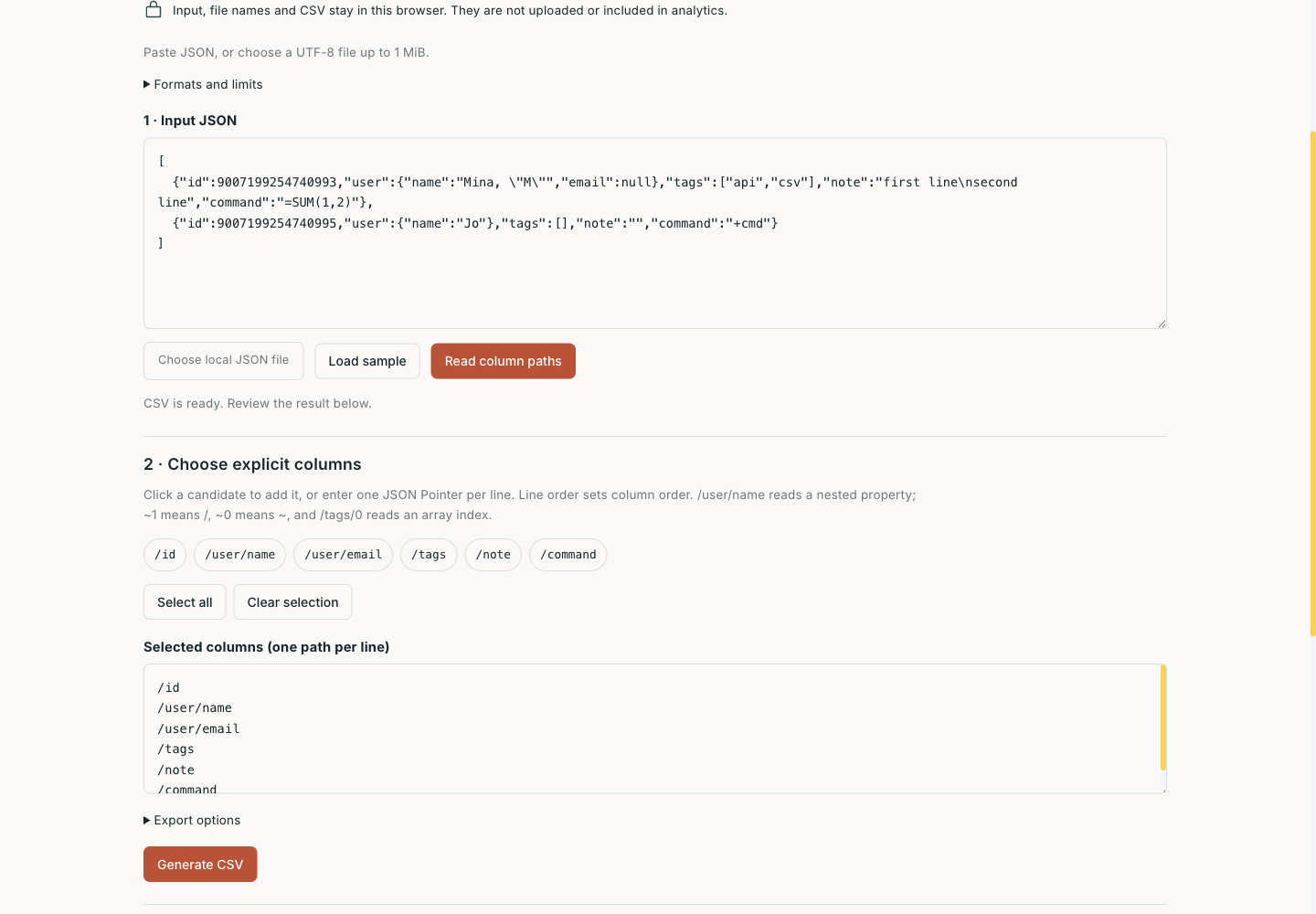
You download two user records from an API for a colleague to review in a spreadsheet. IDs must remain exact, a name contains a comma, email is sometimes absent, and tags are still an array. Replacing commas in the JSON with separators quickly fails. First decide what one row represents, which properties become columns, and what each cell can preserve.
The JSON-to-CSV tool puts those decisions on one page: enter JSON, select explicit columns, then inspect and download the result. Files are read in the current browser; input, filenames and results are not uploaded. This walkthrough uses the built-in sample to explain where large integers, missing values and spreadsheet formulas require different treatment.
Two records, six columns: define the output first
Select Load sample, or download the identical JSON input. These are original test records with no real user data:
[
  {"id":9007199254740993,"user":{"name":"Mina, \"M\"","email":null},"tags":["api","csv"],"note":"first line\nsecond line","command":"=SUM(1,2)"},
  {"id":9007199254740995,"user":{"name":"Jo"},"tags":[],"note":"","command":"+cmd"}
]
Read column paths discovers candidates without automatically exporting them. Click the paths you need, or paste the following six lines into the selected-columns field. Their order determines CSV column order. Select all is also available as a starting point for edits.
/id
/user/name
/user/email
/tags
/note
/command
The column list uses JSON Pointer. /user/name finds user, then name. Escape a literal / in a property name as ~1 and a literal ~ as ~0: the key a/b becomes /a~1b. To select an array’s first item, enter /tags/0 manually. Selecting /tags keeps the complete array in one cell instead of expanding one user into several rows.
Generate CSV reports 2 rows, 6 columns, 1 missing value, 1 null, 1 empty string, 2 structure cells and 2 protected text cells. The first email is null; the second record has no email property. Both tags values are arrays, and both command strings trigger formula protection.
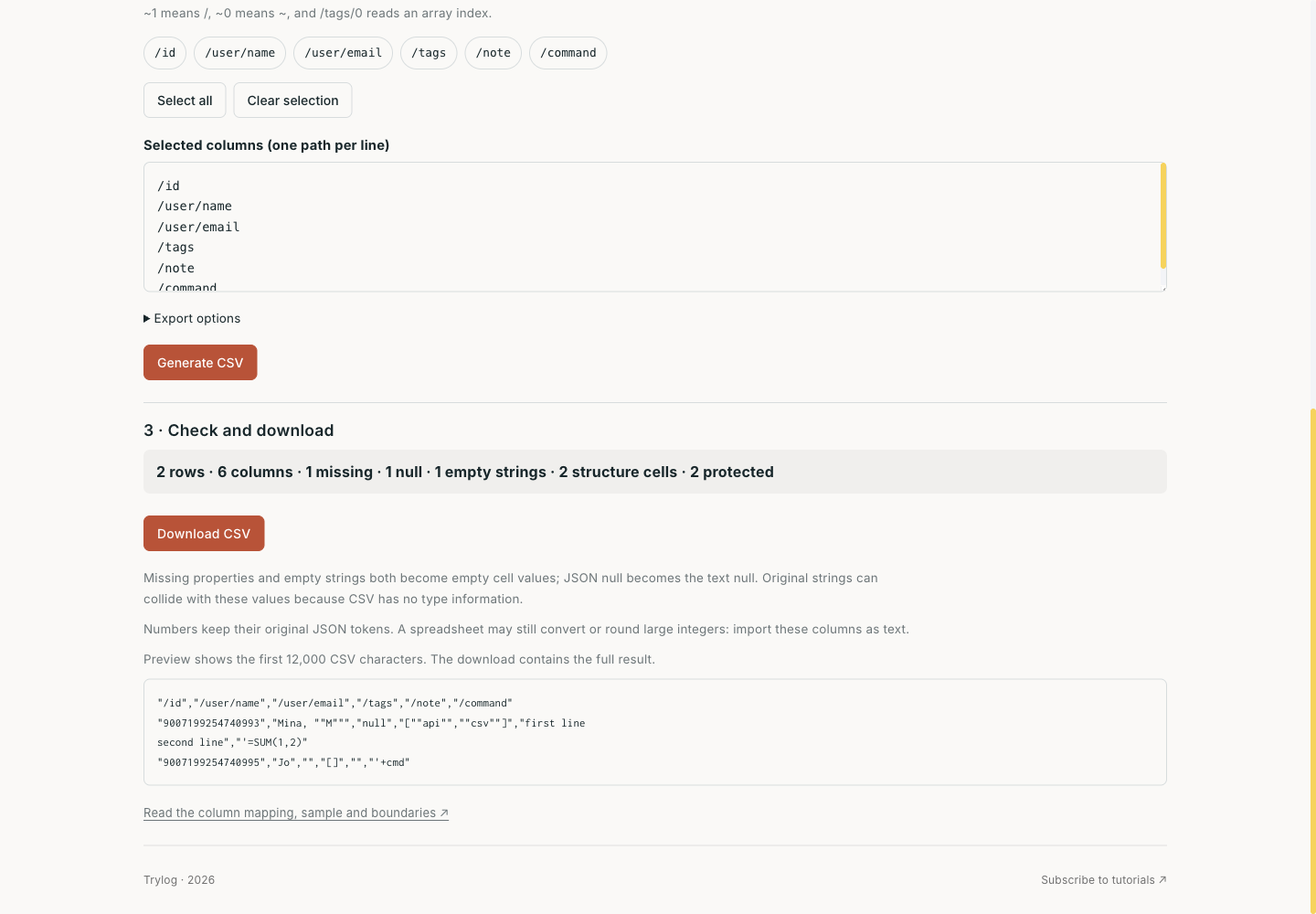
Counts and preview come from the same export. Edits preserve the previous result and pause downloading until you regenerate or restore it.
Preserve numbers during parsing
Both IDs exceed JavaScript’s maximum safe integer, 9007199254740991. Calling ordinary JSON.parse() and then converting a Number to text can already change the original decimal digits. CSV quoting happens later and cannot restore precision lost during parsing.
This implementation uses the syntax tree from jsonc-parser 3.3.1 with comments, trailing commas and empty content disabled. For a numeric node, it keeps the original token using its source offset and length; it never consumes the node’s JavaScript Number value. Export writes that token into CSV. Objects and arrays stored as compact JSON use the same token-preserving serializer.
Actual file import and download retained the distinct IDs 9007199254740993 and 9007199254740995. A separate fixture retained -0, 1.2300e+04, 1e9999 and 1e-9999 exactly as written. This establishes preservation of the number’s textual representation. A spreadsheet can still convert, display in scientific notation or round it after download. Import long-ID columns as text when exact identity matters.
Duplicate property names in the same object are rejected, including decoded equivalents such as "a" and "\u0061". Otherwise, keeping the first or last value would silently become the converter’s decision. Properties are stored in objects with no prototype, so an input key such as __proto__ remains ordinary data.
Missing values, null and arrays need a contract
CSV stores rows, columns and field text, without JSON’s type information. This tool uses the following rules:
| JSON case | CSV field value | What is lost or deferred |
|---|---|---|
| Property absent | Empty text | Same as an empty string; the page separately counts missing values |
Empty string "" | Empty text | CSV alone cannot recover that the property existed |
null | Text null | Same as the original string "null" |
| Number or boolean | Original numeric token, or true / false | The consumer must still determine types |
| Array or object | Compact JSON text | Structure remains in one field and needs parsing downstream |
If the receiving system only accepts simple values, choose Reject arrays and objects under Export options. The sample then fails while /tags is selected. Change the column to /tags/0, or remove it and retry. The tool does not infer how many rows to create or form Cartesian products across arrays.
That is the value of explicit columns. Discovery helps you see available fields, while the column list defines the actual output contract. To distinguish absence from null later, add presence flags in the source or retain JSON. An empty CSV field cannot encode all of those original states.
CSV quoting and formula protection solve different problems
Every field is double-quoted, embedded " becomes "", and records use CRLF. The name Mina, "M" stays in one field; the newline inside note remains inside its field. The downloadable actual default output was checked with an independent CSV reader: three records including the header, six fields each, and the original comma, quotation marks and embedded newline intact.
CSV double quotes do not stop a spreadsheet interpreting =SUM(1,2) as a formula. Default protection prepends an apostrophe to text that starts with optional whitespace followed by =, +, - or @, or that starts with a tab, carriage return or newline. The sample command values become '=SUM(1,2) and '+cmd. Numeric tokens do not receive that prefix.
Protection changes field values. For a script consumer whose behavior you trust, explicitly choose Export original text; the interface identifies the formula risk. Behavior can also vary between spreadsheet programs or after a file is saved again, so import untrusted data as text. See OWASP CSV Injection for further context.
Recover from the failing step
Input is limited to 1 MiB of UTF-8 text or a file containing one object or a nonempty array of objects. Current budgets are 10,000 rows, 128 candidate columns, 32 container levels, 100,000 nodes and 8 MiB of CSV. UTF-8 files with a BOM can be read; an output BOM is a separate option. JSON Lines, comments, trailing commas, duplicate names within an object and unpaired Unicode surrogates are rejected. Newlines in property names are unsupported.
These limits bound synchronous work in the browser. Canceling file selection, invalid files and oversized files preserve the current input and result. Editing text, columns or settings keeps the previous result visible with a clear label and pauses its download. Generate again to produce CSV for the current input. Error recovery keeps your custom column order, while Restore last export restores input, columns and options together. On narrow screens, a bottom action strip makes regeneration and the result reachable once an export exists. If the script has not loaded, the read button stays disabled with an explanatory message.
For this example, the reproducible handoff consists of the input JSON, the six-line column list and the downloaded CSV. Keeping all three makes diagnosis easier than retaining only the spreadsheet: changed ID text points to parsing or spreadsheet import, changed row counts to array expansion, and an unexpectedly empty column to the original property name and selected path.