Choose project management software with a six-task dependency and export test
Run the same two-developer workflow in local Kanboard and Vikunja, check dependencies, completion and exported data, and compare hosting and seat costs.
Two developers are preparing a static calculator release. Alex fixes decimal display, Mina adds regression tests, and review, mobile checks and release notes follow. Six tasks already raise two different questions: who is working, and whom are they waiting for? A useful project-management comparison puts that chain into the candidate products, then exports it.
This walkthrough uses official Kanboard 1.2.54 and Vikunja 2.7.0 images in separate, loopback-only instances on an existing Docker installation. Both receive the same original fixture with Alex and Mina as sample assignees. Completing these tasks tests the management workflow; the calculator itself was not developed or released in this experiment.
Two findings matter immediately: a dependency need not prevent completion, and an export need not retain the task chain. The first affects the team’s definition of Done. The second affects what it can take along when changing tools.
Define six tasks and five dependency edges
Download the fixture and export kit. Its scenario.json is the shared starting point.
| Task | Assignee | Waits for | Completion condition |
|---|---|---|---|
| T1 Fix decimal display | Alex | Nothing | Display 0.1 + 0.2 as 0.3 without changing arithmetic |
| T2 Add regression tests | Mina | T1 | Check display and rejection of non-finite input |
| T3 Review fix | Mina | T2 | Read the change and regression results |
| T4 Document input bounds | Alex | Nothing | Describe finite numbers and empty input |
| T5 Run mobile QA | Mina | T3 | Check the 390px layout and keyboard input |
| T6 Publish release notes | Alex | T4 and T5 | Prepare notes after both branches finish |
There are five edges: T1→T2→T3→T5→T6, plus T4→T6. Creating six titled cards makes a list. Adding assignees, dependencies and completion conditions makes it a handoff. The fixture is small enough to check every exported record before importing an entire company’s work.
Kanboard: a column and a closed task are separate fields
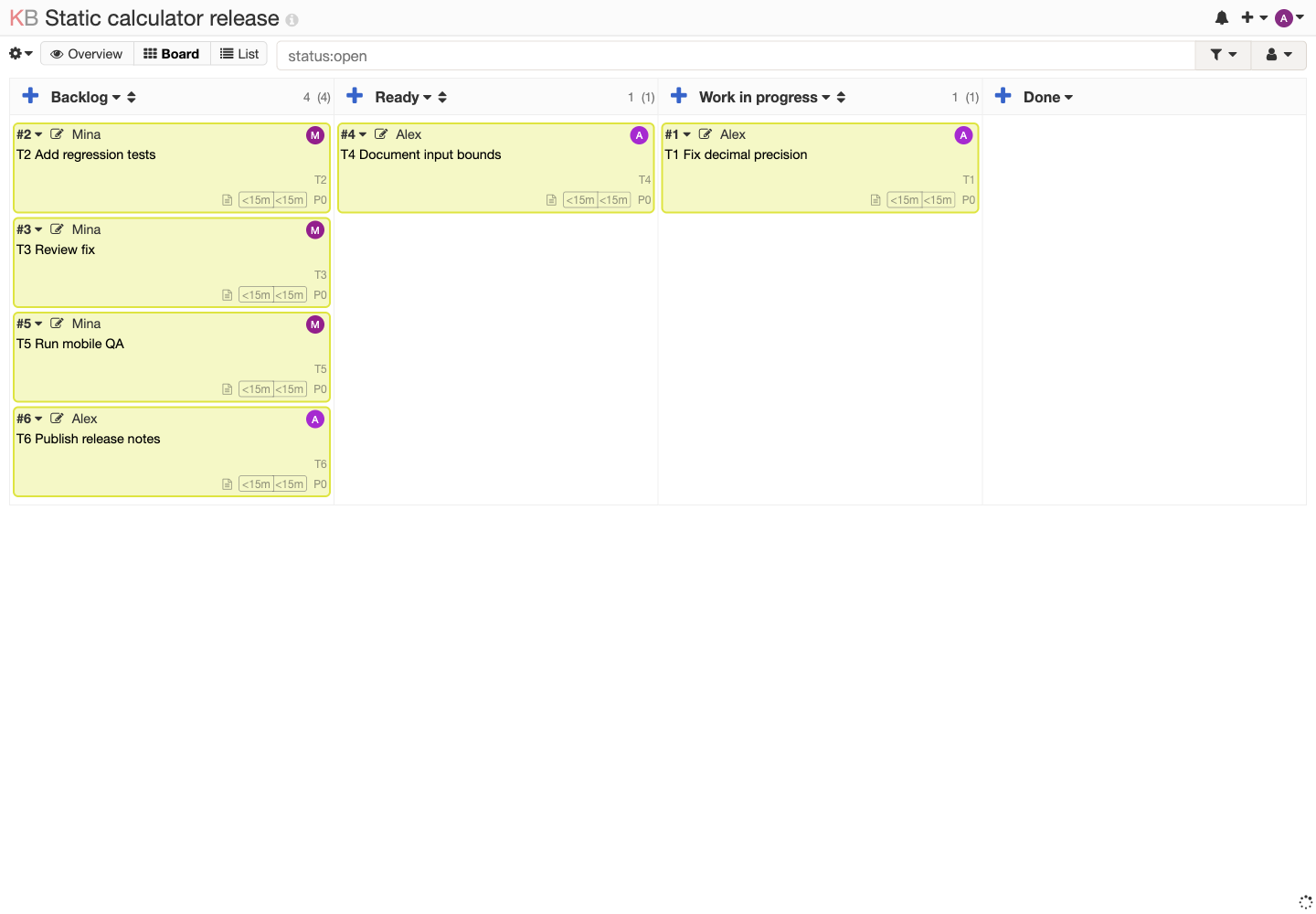
The Kanboard project starts with T1 in Work in progress, T4 in Ready, and four tasks in Backlog. Cards show titles and assignees within the column layout, making the distribution of work easy to scan.
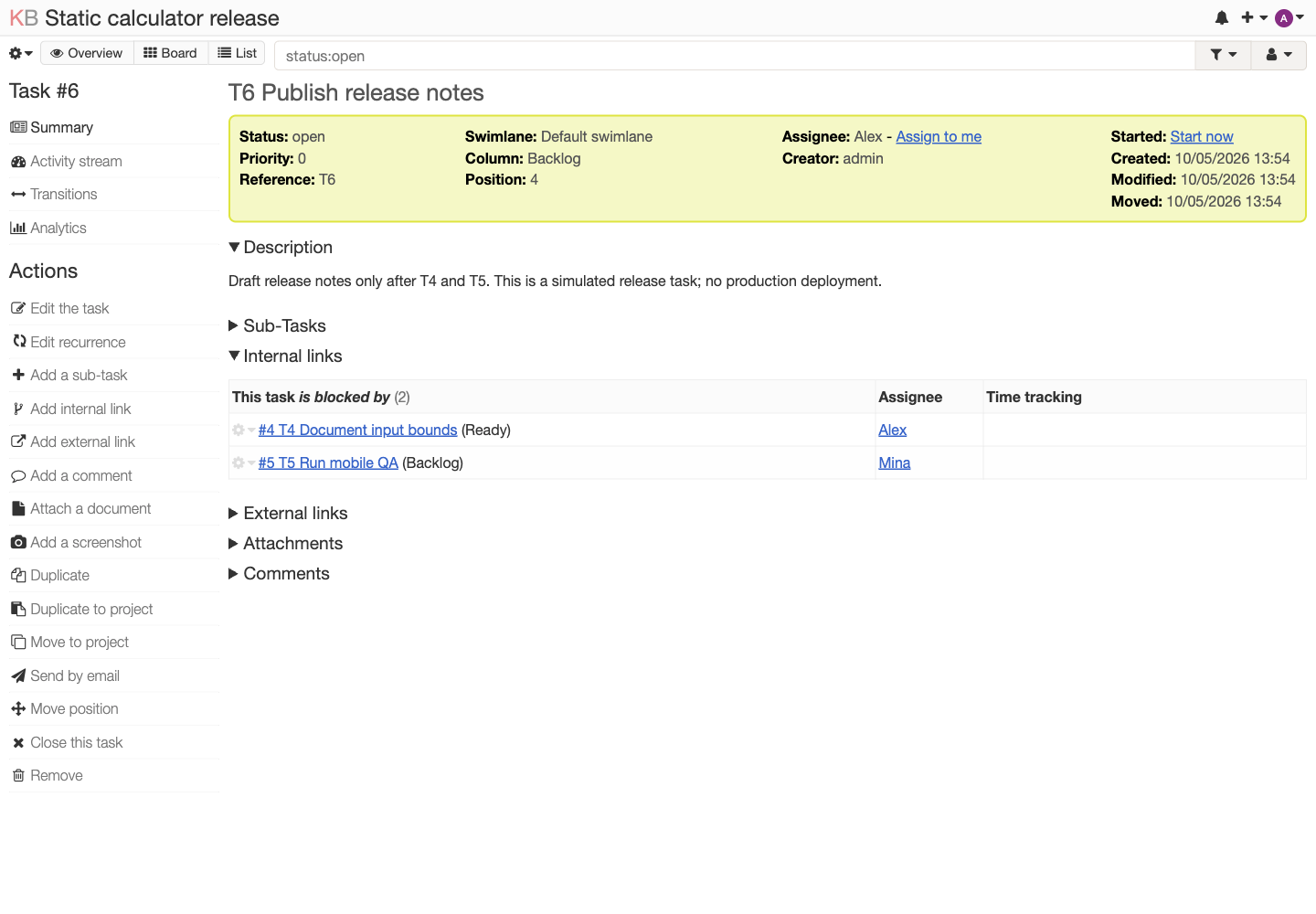
In task details, Add internal link offers is blocked by. Enter the upstream title, select its search result and save. T6 needs two links, to T4 and T5. The internal-links table also shows the corresponding assignees, giving “waiting for earlier work” an identifiable owner.
Closing T1 leaves T2’s relationship in place and T2 itself in Backlog. After closing all six fixture tasks through Close this task, the actual CSV shows Status = Closed for each. Its Column values still retain Work in progress, Ready or Backlog. Closing a task does not automatically move it to a column named Done.
A team should therefore define what moving to Done and closing a task each mean. A report based only on columns may disagree with members who only use Close. This observation applies to the default fixture configuration; available automatic actions require their own configuration and testing and were not added here.
Vikunja: Blocked By provides context but still allows completion
The two local Vikunja users and six tasks were created through the instance’s official API. The project was shared with Mina using read/write permission; a separate Mina session confirmed access to T2 and its assignment. English browser pages were then used to inspect relations and complete tasks. This preparation keeps the fixture consistent; it does not compare the speed of manually creating six tasks.
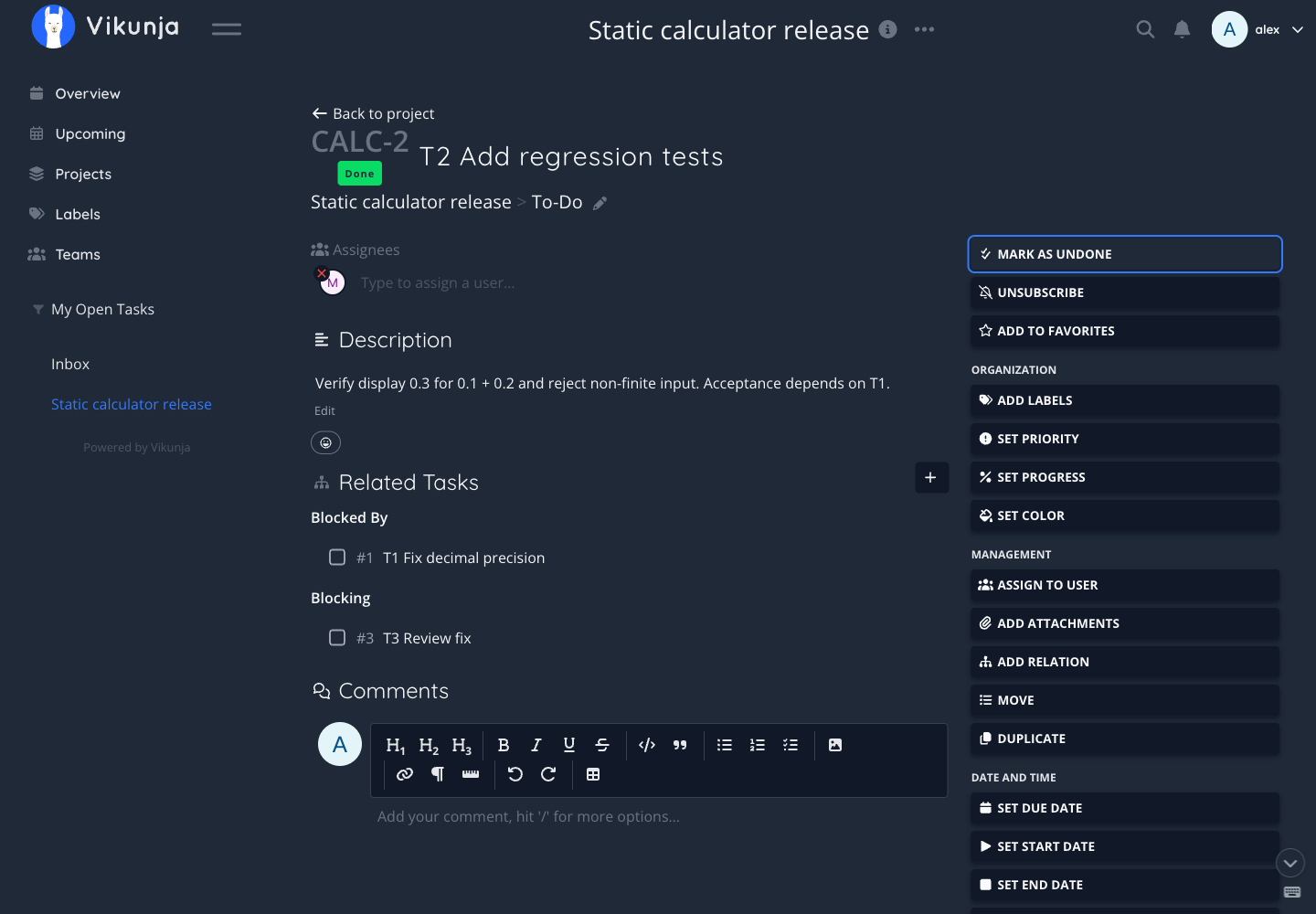
T2’s detail page shows Mina as assignee, Blocked By → T1 and Blocking → T3. With T1 still incomplete, selecting Mark task done on T2 succeeds: a green Done label appears, the action becomes Mark as undone, and T1’s checkbox remains empty. The opening screenshot captures that state.
In this default configuration, the relationship provides context rather than an acceptance lock. If tests must pass after a fix is merged, retain the actual test result, code review or release check in the system responsible for acceptance. A task link helps people find upstream work; it does not replace its result.
The project exposes List, Gantt, Table and Kanban view entries. This test covers the list and task details, not large-project performance, simultaneous editing, reminder delivery or every feature of those views.
Finish the exit path: a CSV list versus structured data
Kanboard’s Exports → Tasks requires start and end dates. The grey dates that appear filled in are placeholders. Clicking Export without entering values returned an empty response; entering the fixture’s date produced the real Tasks.csv browser download. This is a useful step to try during adoption.
The CSV contains six task rows and 24 fields, including assignee, column, status, completion date and time estimates. It has no task-description or task-relation columns. It is suitable for spreadsheet analysis of status, but cannot reconstruct the fixture’s five dependency edges on its own. The kit’s kanboard-tasks.csv preserves the actual downloaded bytes.
Vikunja’s official local user-export API generated a ZIP with data.json, filters.json and VERSION. The project data contains six tasks with done = true, their assignees, and related_tasks in both blocked and blocking directions. Counting blocked edges recovers all five original dependencies.
The kit provides vikunja-task-excerpt.json, an explicitly labelled projection from that real export. It retains task ID, title, description, completion, assignee usernames and blocked_by, while omitting account metadata and default projects. It is not a complete backup or an import format. A real migration should also test restoration in another authorized instance; restoration was not tested here.
| Export check | Kanboard Tasks CSV | Project data in the Vikunja user export |
|---|---|---|
| Six tasks and completion | Present | Present |
| Assignees | Present | Present |
| Descriptions | No column | Present |
| Five dependencies | No column | Present, with both directions |
| Direct spreadsheet reading | Convenient | Requires field extraction or JSON processing |
| Complete restoration test | Not performed | Not performed |
To send selected structured fields to a spreadsheet, use the explicit-column JSON-to-CSV tool and its column-mapping walkthrough. Keep the original JSON when flattening data for a table.
Separate software cost from hosting
The following official offers were checked in October 2026 to compare cost structure. Check current terms before buying; no subscription or paid trial was tested.
| Product and delivery | Official offer | What a two-person team should consider |
|---|---|---|
| Self-hosted Kanboard | The official site describes free, open-source software under the MIT license | No seat billing in this test; hosting, backups, upgrades and incidents remain your responsibility |
| Self-hosted Vikunja | The pricing page offers free AGPLv3 core software | Core tasks, views, teams and shared projects can be self-hosted; Pro management features have separate paid tiers |
| Vikunja Cloud Personal | €4/month or €40/year; 10GB attachment storage listed | An individual account plan, not an organization collaboration quote |
| Vikunja Cloud Organization | €5/user/month or €50/user/year; teams and 50GB attachment storage listed | Two seats at the displayed monthly rate total €10; taxes, checkout conditions and final plan eligibility were not tested |
Vikunja also lists a Family plan for up to five people, explicitly positioned for a household. A business team should choose terms suited to its organization rather than comparing only seat counts. Self-hosting does not eliminate total cost; this experiment reused existing local infrastructure and incurred no new external fees.
For a team that mainly uses board columns to understand workload, can maintain a service, and only needs a status list when exiting, Kanboard’s tested flow is straightforward. When descriptions, dependencies and multiple views need to travel together, Vikunja’s export retained more of this fixture’s context. In either case, agree on the meaning of Done, then ask what the six-task export still lets you understand. That exposes requirements a feature checklist can miss.