Choosing hosting for a static browser tool: assets, routes and runtime boundaries
Use a reproducible JavaScript and WASM example to check static assets, deep links, project paths and backend needs, then compare hosting against official capabilities and usage rules.
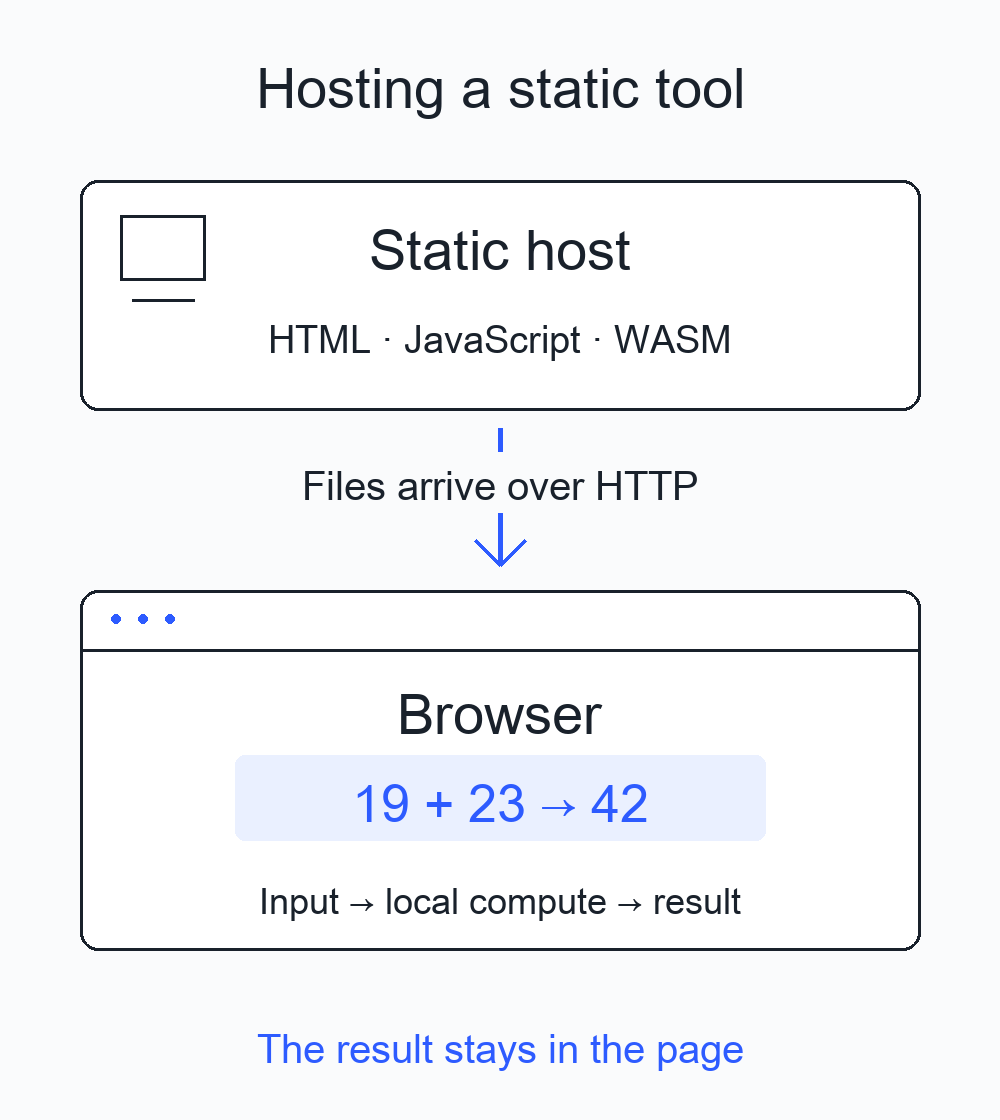
Before choosing hosting for a browser tool, trace what happens each time someone uses it. If the browser downloads HTML, JavaScript and WASM, then computes the result locally, static hosting can deliver that application. If a task must continue after the page closes, or the service must protect secrets, enforce paid access or synchronize shared data, write down those server-side requirements separately.
I used a tiny addition page to make this boundary inspectable: enter 19 and 23, click Add locally, and get 42. It has a home page, a directly accessible /sum/ page, a self-authored 41-byte WASM module and a real 404 page. The results below come from browser tests of a freshly extracted download on a local server. The Cloudflare Pages and GitHub Pages comparison uses their official documentation; I did not deploy this example to either provider.
Locate the input, computation and output
“Static” describes how files are delivered. The host serves the page and its assets over HTTP; the browser then executes JavaScript or WASM. It can read a user-selected file, process data, create a Blob and export a download without server-side business computation. Whether a particular task fits the browser also depends on the algorithm, available APIs, memory and device performance.
Describe your task in one sentence: “The user selects an image, the browser resizes it, and the new file downloads to their device.” That gives you the input, computation and output. Adding “send it to the team tomorrow and keep a cross-device history” introduces persistent execution, identity and shared storage.
| Task | Execution and requirements |
|---|---|
| Read a local file, compute and download | Consider a client-only implementation; confirm the library runs in a browser |
| Keep settings after a refresh | Browser storage may suffice; cross-device synchronization needs a separate design |
| Read an external public API | The page can be statically hosted; it still depends on that API, connectivity and CORS |
| Protect a paid API key or enforce access | Requires a trusted server or an independent identity service |
| Handle payment webhooks, shared data or work after closure | Requires the corresponding backend capabilities and operations |
Using Node.js, Python or CI during a build does not mean those processes must run when someone opens the published site. Inspect the build output: complete HTML, scripts and assets can be delivered statically. Conversely, a secret bundled into JavaScript or WASM is still available to visitors who download those bytes. Compilation is not a way to keep a service credential private.
A minimal example you can inspect
Download the example ZIP. The example is original code under the MIT license with no third-party dependencies. add.wat contains the readable WASM source, and add.wasm is its 41-byte encoding.
static-hosting-check/
  index.html
  sum/index.html
  404.html
  app.js
  add.wasm
  .nojekyll
  add.wat
  serve.py
  README.md
  LICENSE
The first six entries are static site files. .nojekyll skips Jekyll when GitHub Pages publishes plain files from a branch; projects using a build workflow should retain their own publishing setup. serve.py is a local teaching server, not a production backend to upload and run. Extract the archive, enter static-hosting-check, and run this with Python 3.9 or later; there is no installation step:
python3 serve.py --port 8760Open http://127.0.0.1:8760/, wait for Ready, then click Add locally. The default input produces 42; changing it to -10 and 3 produces -7. Inputs are restricted to integers between minus and plus one million, so this example does not present 32-bit WASM addition as arbitrary-precision arithmetic. Open http://127.0.0.1:8760/sum/ directly and refresh it: the same script and module should load. Finally, /missing/ should return HTTP 404.
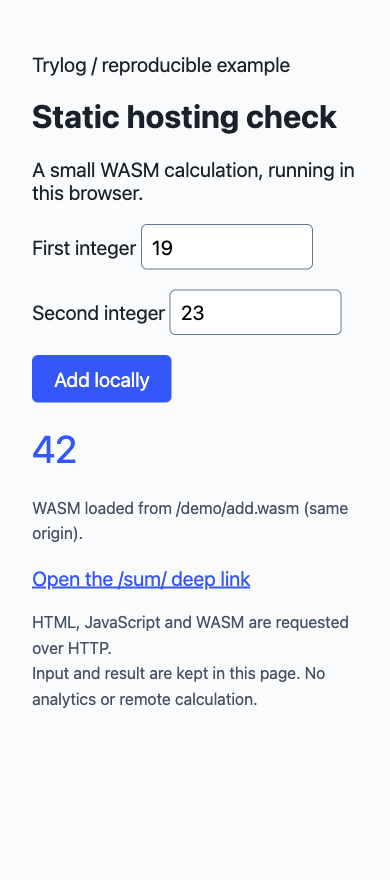
Actual browser result: WASM loads from /demo/add.wasm, and the calculation runs inside the page.
WASM is included to test asset delivery requirements. JavaScript can perform this addition on its own; the example establishes no performance advantage. A small, single-threaded module also does not cover the memory, threading or large assets required by media-processing libraries.
A deep link needs a matching entry point
A successful in-page navigation only verifies that navigation. Copying a URL to a new window, opening it directly or refreshing makes the browser request that path from the host again.
This example gives /sum/ a real sum/index.html file. Both HTML pages use the same app.js; the second HTML file makes the routing handoff explicit, without a client-side router. Prebuilding a few HTML pages often suffices for a small tool.
An SPA commonly uses one HTML file and interprets paths such as /sum/ in JavaScript. The static server must return the entry point for the appropriate requests; the client router then decides what to show. Cloudflare Pages’ Serving Pages documentation explicitly says that without a top-level 404.html, Pages assumes an SPA and directs incoming paths to the root entry point. With a top-level 404.html, its Not Found rules locate the closest 404 page. This fixture deliberately includes that top-level file and uses real pages with real 404 responses.
GitHub Pages’ custom 404 documentation describes using 404.html or 404.md. Real HTML files make this two-page example straightforward to open and refresh. A project could instead use hash routing such as /#/sum: the fragment after # is not sent as the HTTP path, so the host still receives a request for the home page, while the link format changes. Putting an SPA shell in a 404 page may display the application, but the error status still needs a separate check.
To see an excessively broad fallback, open another terminal:
python3 serve.py --port 8762 --spa-fallback/missing/ now receives the home page with HTTP 200. /missing.wasm also receives that HTML. This is an intentionally wrong configuration in a teaching server, not a measurement of any provider’s response. For both unknown pages and missing assets, inspect the status, Content-Type and response body. A successful-looking request may have delivered the wrong file.
A project path changes asset URLs
GitHub Pages’ official introduction distinguishes two default locations: user or organization sites use https://<owner>.github.io/, while project sites use https://<owner>.github.io/<repositoryname>/. Custom domains are also supported; use the final public URL to determine the actual mount point.
If the project lives at /demo/, fetch('/add.wasm') requests /add.wasm at the domain root and loses the project prefix. The example resolves its asset relative to the script:
const wasmURL = new URL('./add.wasm', import.meta.url);
const response = await fetch(wasmURL);
The home page loads ./app.js, while sum/index.html loads ../app.js. Both find the script at the project root, and the module URL follows that script’s location. With a bundler, set its base or public path to the actual mount directory, then check images, fonts, Workers and dynamic imports as well as the home-page links.
Test the project prefix in a third terminal:
python3 serve.py --port 8761 --base /demo/Open http://127.0.0.1:8761/demo/sum/ directly. It should report loading /demo/add.wasm and still produce 42 from the default inputs. /add.wasm on this same server should return 404. This local test checks URL resolution; it does not emulate GitHub’s full routing, caching or deployment system.
Verify WASM bytes and MIME type
MDN’s instantiateStreaming documentation requires WASM to be served as application/wasm; an incorrect MIME type rejects the promise with a TypeError. The example checks the status and type before compilation:
if (!response.ok) throw new Error(`WASM HTTP ${response.status}`);
if (response.headers.get('Content-Type')?.split(';')[0].trim()
    !== 'application/wasm') {
  throw new Error('Expected application/wasm');
}
const { instance } = await WebAssembly.instantiateStreaming(response);
In normal mode, /add.wasm returned 200 application/wasm with the 41-byte module. The bad fallback returned 200 text/html for /missing.wasm, and actual browser streaming compilation threw a MIME TypeError. Checking only response.ok misses this false success. Reading an arrayBuffer() before compiling is another loading strategy, but cannot turn HTML into valid WASM; still diagnose why the server returned the wrong content.
Same-origin assets use the page’s protocol, host and port, so this fixture needs no cross-origin WASM access. Moving assets to another domain requires checking that domain’s CORS policy. A multithreaded library that depends on SharedArrayBuffer also requires checking cross-origin isolation and the relevant response headers in target browsers. This example needs neither; its success does not establish compatibility for all WASM tools.
Compare two hosts against the requirements
The following capabilities and usage rules were checked against official sources on October 5, 2026. This comparison covers the delivery requirements of the example, with no bill estimate or price ranking.
Cloudflare Pages here means that product. Trylog itself uses Workers Static Assets with language selection at the root path. That is this site’s routing requirement, not a general reason for a static client tool to require business logic in a Worker.
| Check | Cloudflare Pages | GitHub Pages |
|---|---|---|
| Static pages | Serves matching HTML paths | Publishes HTML, CSS and JS from a repository |
| Deep links | Real files; conditional default SPA entry point | This example uses real files; a custom 404 is supported |
| Mount location | Check the final site URL | Account site at root; default project site under a repository prefix |
| Server extension | Pages Functions is a separate server-side capability | Pages is a static hosting service |
Cloudflare Pages’ _headers documentation provides configuration for static asset response headers. Those rules do not apply to responses produced by Pages Functions; its code must set the headers. This is a documented capability to check if your project needs custom static headers. Authentication and API requirements should determine whether to add Functions; running client-side JavaScript is not itself a reason.
Asset size can change the decision. Pages’ Limits documentation lists a maximum of 25 MiB per site asset and 20,000 files on the Free plan. A browser media library may require no server computation yet contain a WASM or model file too large to upload unchanged. Measure your actual build output before considering splitting assets or another delivery arrangement. Moving to another domain or service also requires revisiting same-origin behavior, CORS and privacy promises.
GitHub Pages’ usage limits have a more immediate effect on commercial choices: the documentation disallows using it as free hosting to run an online business, e-commerce site or a site primarily facilitating commercial transactions or providing commercial SaaS. Check the actual use case before choosing it for a paid tool, even if the application builds into static files. The same document lists a maximum published site size of 1 GB and a soft monthly bandwidth limit of 100 GB. A soft limit is not guaranteed capacity or a service-level commitment.
For a few static pages like this example, the primary engineering decisions are asset paths and 404 behavior. If you want repository-based project presentation, check GitHub Pages’ usage scope and project prefix. If you need Pages’ documented static headers or default SPA handling, continue checking Cloudflare Pages against those requirements. The final decision should also record intended use, real asset sizes, publishing workflow and current service terms.
Make the handoff reusable
Replace the example column with your project’s facts. Another developer can use it for review, and you can reuse it when changing hosts.
| Item | This example’s requirement and passing condition |
|---|---|
| Input and output | Two bounded integers → local WASM addition → page result |
| Data location | Inputs and result stay in the page; loading code still makes HTTP requests |
| Runtime | JavaScript modules and streaming WASM instantiation; single-threaded |
| Public files | Two HTML entry points, 404, JS and a 41-byte WASM module |
| Public path | / or /demo/; resolve assets from the script location |
| Page routing | Direct opening and refreshing /sum/ works; unknown paths return 404 |
| Asset response | WASM returns 200, application/wasm and a valid module |
| Failure display | Loading failure shows Load failed rather than a fabricated result |
| Backend | No server business computation, accounts or shared storage in this fixture |
| Usage conditions | Review terms, asset and deployment limits; keep the sources |
Repeat these checks on the final domain before accepting a deployment. Network should show HTML, scripts and WASM requests. In this example, calculating with two sets of numbers added no computation requests to the resource list. For a real tool, also inspect outbound fetch, XHR, forms, WebSockets and analytics. GitHub’s introduction explicitly records visitor IPs for security, so describe “local file processing” with its actual data scope rather than claiming a visit creates no network metadata.
Keep build files, readable source, the license, routing requirements and reproduction commands in the handoff. Stop each server you started with Ctrl-C when testing is finished. When changing hosts, use the same requirements sheet to check the new responses and keep the boundary between computation and file delivery clear. To connect these checks to your build and release workflow, continue with building, publishing and recovering a static tool.