DeepSeek Flash API migration: model aliases, thinking, and tool calls
Learn how to update existing OpenAI-compatible clients to the deepseek-flash model alias for DeepSeek-V4.1-Flash-1017 while handling thinking mode defaults, token limits, and tool choice restrictions.
DeepSeek released DeepSeek-V4.1-Flash-1017 on October 17, 2026. The official model table specifies deepseek-flash as the chat request’s model value and currently maps that alias to this release. When migrating an OpenAI-compatible client, check that field first, then review default thinking behavior, output budgets, and tool-choice restrictions.
This guide follows the official documentation. No paid model calls or performance tests were run.
Model Alias Mapping and Base Endpoint Setup
The first step in updating your integration is aligning the base URL and model string with the documented specifications. According to the DeepSeek Models and Pricing documentation, use deepseek-flash when calling the current Flash model in your request payload, which the platform maps to DeepSeek-V4.1-Flash-1017. The base URL remains https://api.deepseek.com, and chat requests use the standard POST /chat/completions endpoint. Executing requests against this endpoint requires an existing funded DeepSeek API account and key, which should be stored in a server-side environment variable rather than embedded in client code.
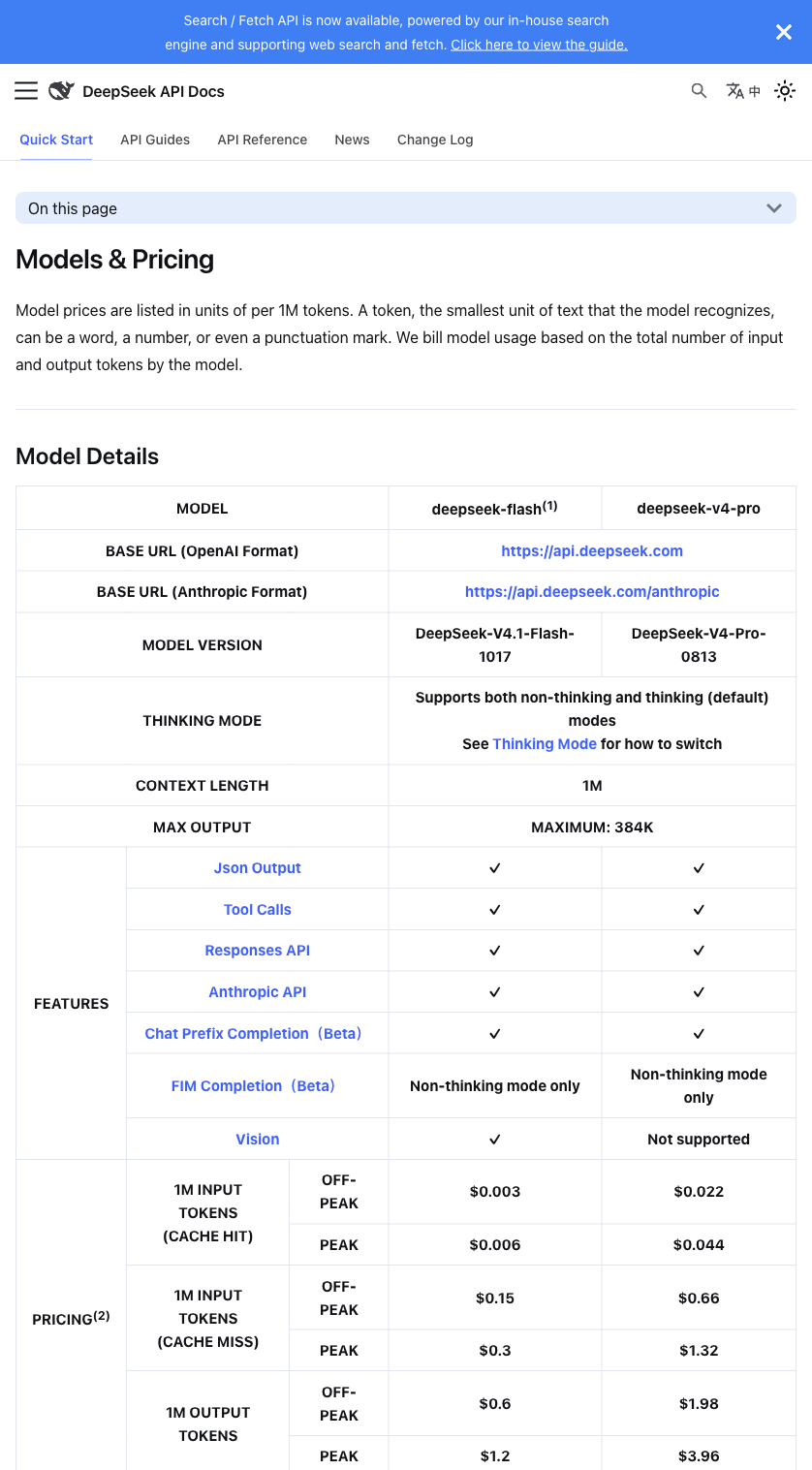
The official DeepSeek model table lists the alias, context window, and output limit.
Under the hood, deepseek-flash provides a 1M token context window and supports a maximum output length of 384K tokens (up to 393216 for max_tokens). When migrating legacy integrations, leaving max_tokens unset or keeping outdated hard-coded values can lead to unexpected truncation or budget shifts, because the default output limit changes dynamically depending on how thinking mode is configured. Regardless of which default or explicit limit applies, the sum of input tokens and output tokens must always fit within the 1M context window. If you are validating how payload changes affect downstream parsers during a migration, our guide to API response shape diffs covers practical ways to catch structural mismatches early.
How Thinking Parameters Control Output Limits
The Chat Completions API reference enables thinking by default. Use reasoning_effort or thinking.type to control it; if both are omitted, the default effort is high. The example below sets only reasoning_effort so it does not send contradictory switches.
When reviewing your request builder, make sure your configuration accounts for these exact parameter rules:
- reasoning_effort: Accepts none, low, high, or max, with high as the default. Setting reasoning_effort to none disables thinking mode.
- thinking.type: Accepts enabled or disabled, with enabled as the default.
- max_tokens bounds and defaults: Accepts an integer from 1 to 393216. When max_tokens is omitted, the default output limit is 8K without thinking mode, 64K when standard thinking mode is active, and 128K when reasoning_effort is set to max.
If an endpoint in your application handles straightforward classification, extraction, or short conversational turns where extended reasoning is unnecessary, you can explicitly pass “reasoning_effort”: “none” or set thinking.type to disabled. Otherwise, the request will default to high reasoning effort and a 64K default output ceiling. Conversely, for complex coding or analytical tasks where you intentionally use high or max effort, setting an explicit max_tokens value within the 1..393216 range helps keep token consumption predictable while ensuring that prompt tokens plus completion tokens stay under the 1M context limit.
Temperature Behavior and Tool Choice 400 Errors
The most common breaking changes during a migration to deepseek-flash involve sampling controls and function calling constraints while thinking mode is active. Many OpenAI-compatible codebases globally attach a temperature setting (such as 0.0 or 0.3) and rely on tool_choice to force structured tool execution.
When thinking mode is active on deepseek-flash, two strict rules apply:
- temperature has no effect: Any temperature value passed during thinking mode is ignored by the API. Relying on low temperature settings to constrain output determinism will not change generation behavior while reasoning is enabled.
- Forced tool_choice returns a 400 error: Passing “tool_choice”: “required” or specifying a named tool choice object while in thinking mode causes the API to reject the request with an HTTP 400 error.
With thinking enabled, a request that requires a tool or pins a named tool is outside the documented API contract. Inspect each call site that sends a tools array. For thinking requests, remove forced choices and let the model select a tool, then validate the result in your application. For forced execution, disable thinking on that request with "reasoning_effort": "none". Our guide to classifier failure and recovery states discusses handling upstream rejections and unexpected outputs.
Adapted Request Example and Configuration Reference
The following is a minimal adaptation of the official chat-completions example. $DEEPSEEK_API_KEY in the HTTP block is a placeholder; the real server-side client must read the key from its environment.
POST https://api.deepseek.com/chat/completions
Authorization: Bearer $DEEPSEEK_API_KEY
Content-Type: application/json
{
"model": "deepseek-flash",
"messages": [
{
"role": "user",
"content": "Explain this error message."
}
],
"reasoning_effort": "high",
"max_tokens": 4096
}In this payload, model is set to deepseek-flash, reasoning_effort is explicitly declared as high so the behavior is self-documenting in code, and max_tokens is capped at 4096 rather than relying on the 64K thinking default.
Verification Steps Before Deploying
After updating your configuration, check the following in your own staging environment:
- Search your codebase and environment configs to verify that no request sends DeepSeek-V4.1-Flash-1017 as the model parameter; ensure every call uses “model”: “deepseek-flash” against https://api.deepseek.com.
- Audit all request builders that pass tools: verify that any call leaving thinking mode enabled (reasoning_effort set to low, high, or max, or omitted) does not pass tool_choice: “required” or a named tool object, eliminating HTTP 400 failures before deployment.
- Explicitly set reasoning_effort (or thinking.type) and a bounded max_tokens value between 1 and 393216 on each route according to whether the task needs reasoning, then run a single staging request with your funded API key to confirm a 200 response and expected payload structure.