Grok Voice 3.0 realtime API: pin the model and handle session events
Upgrade your realtime voice WebSocket client by pinning grok-voice-3.0, separating server and browser authentication, and verifying session and audio delta events.
When your application opens a wss://api.x.ai/v1/realtime connection to drive an interactive voice agent, the model query parameter determines which underlying speech-to-speech release processes the stream. According to the Grok Voice 3.0 announcement and the model documentation, grok-voice-3.0 launched on October 14, 2026 as xAI’s dedicated speech-to-speech model for real-time voice agents. This pipeline is distinct from standard text generation, image generation, standalone text-to-speech (TTS) endpoints, or batch transcription versions. Alongside this release, grok-voice-2.0 has been deprecated.
How you handle the migration depends on how your client currently specifies the model parameter. As noted in the Speech to Speech documentation, the grok-voice-latest alias now points directly to grok-voice-3.0. Existing clients using that alias have already been upgraded automatically on the backend. However, if your client pins grok-voice-2.0, or if you want deterministic release behavior instead of relying on a moving alias, you must update the WebSocket URL query string to explicitly pin model=grok-voice-3.0.
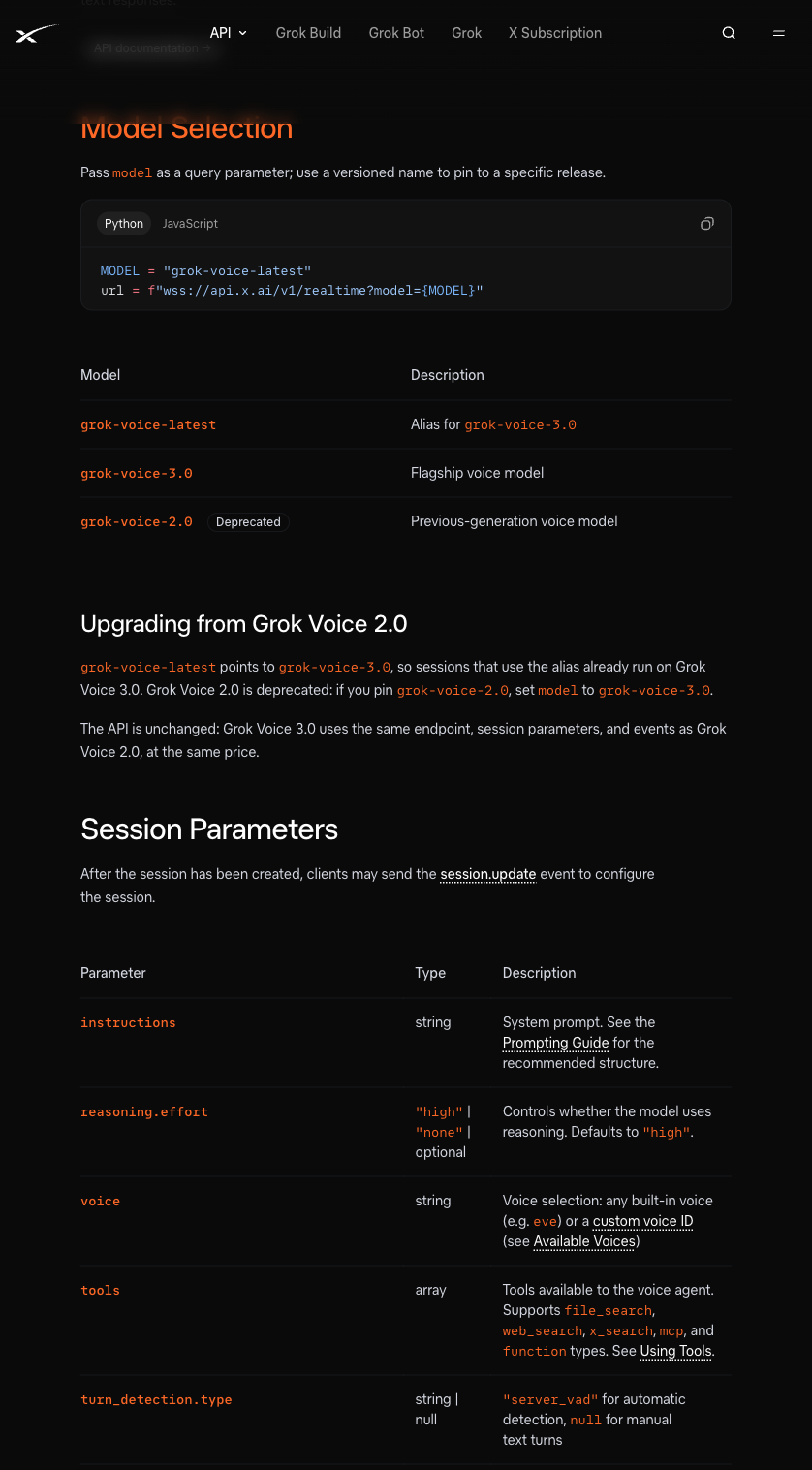
The official xAI documentation lists model aliases and the upgrade from 2.0.
For engineering teams migrating from 2.0, the transition requires minimal structural code changes: the WebSocket endpoint (wss://api.x.ai/v1/realtime), session configuration parameters, and client/server event schemas remain unchanged from grok-voice-2.0. Official documentation also states that grok-voice-3.0 launches at the same price as Grok Voice 2.0 at $0.08 per minute ($4.80 per hour). When estimating costs, evaluate billed-duration mechanics separately for your specific session lifecycles rather than extrapolating a total operational bill solely from the per-minute rate. Additionally, because specific rate-limit figures are not displayed on the public model documentation page, avoid hardcoding assumed concurrency thresholds in your client limiters.
Endpoint Connection and Authentication Boundaries
Connecting to wss://api.x.ai/v1/realtime?model=grok-voice-3.0 requires different authentication patterns depending on whether the WebSocket client runs on a backend server or inside a user’s browser. In a server-side environment such as Node.js or Python, the client can attach standard HTTP headers during the WebSocket handshake, passing the permanent API key via Authorization: Bearer $XAI_API_KEY. The permanent credential stays strictly inside server environment variables.
Browser environments enforce a different boundary. Standard browser WebSocket implementations cannot set custom Authorization headers on handshake requests, and you must never embed a permanent API key in frontend bundles or expose it to client-side sessions (for more on isolating session credentials and client boundaries, see our guide to PWA dynamic responses, CSP, and session privacy). Instead, browser clients must authenticate using short-lived ephemeral tokens minted by your backend, passing the token during handshake via the xai-client-secret.<token> WebSocket subprotocol.
Session Configuration and Text-to-Audio Event Walkthrough
Once the WebSocket handshake succeeds, the client and server communicate by exchanging JSON event payloads. Even when building a full speech-to-speech agent, sending a text input item and inspecting the returned audio delta events lets you check the event sequence without introducing microphone capture noise.
The baseline verification sequence relies on three client-to-server events:
- session.update: Sent immediately after opening the socket to configure session behavior. Inside the session object, you can select the output voice (“voice”: “eve”), provide system instructions, and configure turn_detection. Setting turn_detection.type to “server_vad” enables server-side voice activity detection, whereas setting it to null disables automatic turn detection so your client can manage turn boundaries manually. The session also supports reasoning.effort with values “high” or “none”, defaulting to “high”.
- conversation.item.create: Appends a user turn to the conversation state. For a small protocol check, pass an item with “type”: “message”, “role”: “user”, and a content array containing an “input_text” block such as “Hello!”.
- response.create: Instructs the model to generate an assistant response based on the current conversation context. The server then streams back response events, delivering synthesized audio chunks inside response.output_audio.delta payloads.
The JavaScript example below adapts the official quick start by pinning grok-voice-3.0. No paid calls or audio-playback tests were run for this guide. The code logs event types and does not implement microphone capture or playback.
import WebSocket from "ws";

const ws = new WebSocket("wss://api.x.ai/v1/realtime?model=grok-voice-3.0", {
  headers: { Authorization: `Bearer ${process.env.XAI_API_KEY}` },
});
ws.on("open", () => {
  ws.send(JSON.stringify({
    type: "session.update",
    session: { voice: "eve", instructions: "You are a helpful assistant.",
      turn_detection: { type: "server_vad" } }
  }));
  ws.send(JSON.stringify({
    type: "conversation.item.create",
    item: { type: "message", role: "user",
      content: [{ type: "input_text", text: "Hello!" }] }
  }));
  ws.send(JSON.stringify({ type: "response.create" }));
});
ws.on("message", (data) => {
  const event = JSON.parse(data);
  console.log("Event:", event.type);
});
Running this script in your own environment requires an active xAI API account with available balance, along with the ws package in Node.js (or websockets in Python).
Audio Encoding Formats and Payload Verification
When your message listener logs incoming response.output_audio.delta events, your audio pipeline must decode the payload according to the active session format. By default, grok-voice-3.0 outputs 16-bit little-endian linear PCM at a 24kHz sample rate (PCM16 little-endian at 24kHz).
If your playback pipeline or telephony bridge requires a different sample rate or codec, you can configure the session among the officially supported formats:
| Audio Codec | Supported Sample Rates (Hz) | Default Transport Framing |
|---|---|---|
| PCM (PCM16 little-endian) | 8000, 16000, 22050, 24000 (default), 32000, 44100, 48000 | Base64-encoded strings inside JSON events |
| PCMU / PCMA (G.711) | 8000 | Base64-encoded strings inside JSON events |
| Opus | 24000 | Base64-encoded strings inside JSON events |
Pay close attention to transport framing when wiring up your audio decoder. Under the default JSON event transport, audio deltas arrive as Base64-encoded strings inside response.output_audio.delta messages; binary WebSocket transport is a separate configuration and should not be conflated with JSON delta parsing (for strategies on validating payload contracts across API updates, see diffing API response shapes).
In your own staging environment, first check that session.update produces no error, then look for response.output_audio.delta after response.create. With the default PCM16/JSON transport, decoded byte counts should align to 16-bit samples. This only checks payload alignment: playback also needs the configured sample rate, buffering, cancellation, and connection-error handling.